Weighted forecasting multiplies each opportunity’s value by its historical stage win rate to produce a probability-adjusted revenue projection instead of a simple pipeline total. This approach grounds the forecast in how similar deals have closed historically, not in what reps believe will happen this quarter.
7 Steps to Accurate Pipeline Forecasting in CRM
Define objective stages with explicit entry and exit criteria
Calculate historical win rates by stage
Build a weighted pipeline formula
Enforce data hygiene automatically via an AI agent
Track deal health signals beyond stage
Run weekly exception-based reviews
Measure forecast accuracy weekly and recalibrate
Step 1: Lock In Clear Stage Definitions and Criteria
Inputs: Recent closed-won and closed-lost deals (minimum 10–20), current stage list, rep interview notes on how deals actually progress.
Decision: Identify which stages reflect genuine buyer advancement versus internal seller activity.
Checkpoint: Every stage has a documented entry condition and a buyer-verified exit condition.
Output: A stage playbook with objective criteria enforced as required CRM fields.
Proposal, exit: proposal reviewed by decision-makers (not merely sent)
Negotiation, exit: terms agreed, contract in review
Closed Won / Closed Lost
Common mistake: Reps advance deals without completing required fields because manual data entry feels like busywork compared to selling. Without a system that blocks stage progression until exit criteria are met, the stage label loses meaning. A deal marked “Proposal” may lack a documented champion or confirmed budget, making it indistinguishable from a “Discovery” deal. Once stage labels lose their operational definition, every downstream probability calculation is corrupted because historical win rates no longer match the deals they are applied to.
Step 2: Turn History into Stage-Level Win Rates
Inputs: At least two full quarters of closed-won and closed-lost deal data, segmented by the stage each deal occupied at a fixed snapshot date.
Decision: Decide whether win rates are calculated per stage, per segment, and per rep, or blended into a single org-wide number that hides variance.
Checkpoint: Win rates are back-tested quarterly against actual outcomes, not borrowed from CRM defaults.
Output: A stage probability table with documented sample sizes and recalibration dates.
Common mistake: Teams use CRM default probabilities such as “Proposal = 60%” that were never validated against actual close data. These figures remain assumptions, not measurements, and they silently corrupt every weighted forecast.
Step 3: Apply a Simple Weighted Pipeline Formula
Inputs: Validated stage win rates from Step 2, current open pipeline with accurate deal amounts.
Decision: Decide whether to apply a slippage discount for deals that historically push quarters.
Checkpoint: Weighted total is compared against quota to produce an adjusted coverage ratio.
Output: A live weighted pipeline number that updates whenever deal stage or amount changes.
Inputs: Email, calendar, and call transcript streams connected to the CRM.
Decision: Define which fields are mandatory at each stage and what triggers an automatic flag when they are missing or stale.
Checkpoint: No deals advance without required fields populated, and activity is logged without rep action.
Output: A continuously clean CRM where every deal reflects real buyer activity.
Manual data entry is the largest single source of forecast error. AI agents can automate data entry by logging call notes, updating contact records, and syncing engagement data across CRM systems, which frees reps from the data-clerk role. Coffee’s agent connects to Google Workspace or Microsoft 365 and immediately begins capturing every email, calendar event, and call transcript, then writes structured activity back to Salesforce or HubSpot without rep input. The table below contrasts four critical data-entry tasks and shows how each shifts from inconsistent manual execution to automatic capture.
Automated meeting prep with Coffee AI CRM Agent
Task
Manual Process
Coffee AI Agent
Activity logging
Rep manually logs calls and emails, frequently skipped
Captured automatically from email and calendar in real time
Required field enforcement
Manager reminds reps in weekly review, inconsistent
Agent blocks stage advancement until fields are populated
Contact and company creation
Rep creates records manually, duplicates common
Agent auto-creates and enriches from email signatures and calendar
Call transcript and summary
Rep writes notes post-call, detail varies by rep
Agent joins call, transcribes, and writes MEDDIC/BANT-structured summary
Key signals to monitor automatically, ranked by predictive power:
Days in current stage versus historical median, the earliest indicator that a deal is stalling and often visible weeks before a rep acknowledges the problem
Number of unique stakeholders with logged activity in the last 14 days, because single-threaded deals close at roughly 23%, so engagement breadth directly affects win probability
Presence of a confirmed next step with a future date, since deals without a scheduled next action are effectively stalled even when the stage has not changed
Competitor mentions detected in call transcripts, which signal competitive pressure that may require pricing or positioning adjustments
Deal amount changes after verbal commit, which often indicate scope reduction or budget constraints that surfaced late
Step 6: Run Weekly Reviews Based on Exceptions
Inputs: Automated exception report generated by the AI agent, covering stale deals, missing fields, stage-skipped opportunities, and deals with no recent activity.
Decision: Decide which exceptions require manager action versus automated remediation.
Checkpoint: Review agenda is driven entirely by the exception list, not by scrolling through every deal.
Output: Updated deal statuses, re-engaged or closed-lost stale deals, and a revised weighted forecast.
A regular review schedule prevents surprises at quarter-end, allowing sales leaders to make adjustments before small gaps turn into major losses. Exception-based reviews replace interrogation with action. The table below defines four common exception types, their trigger conditions, required remediation steps, and ownership so you can use it as a ready-made agenda for your weekly pipeline review.
Exception Type
Trigger Condition
Required Action
Owner
Stale deal
No activity in 21+ days
Re-engage or close lost
AE + Manager
Missing required field
Close date or amount blank
Populate before next review
AE
Stage skip detected
Deal advanced without exit criteria met
Revert stage and complete criteria
Manager
Single-threaded deal
Only one stakeholder with activity in 30 days
Map additional contacts
AE
Step 7: Check Forecast Accuracy Weekly and Adjust
Inputs: Locked forecast snapshot taken at the start of each period before reps can retroactively update records, and actual closed revenue at period end.
Decision: Determine whether variance sits within ±10%, and if not, identify which stage probability or hygiene assumption created the error.
Checkpoint: Forecast error is measured at the rep, segment, and product level, not only at the aggregate, so canceling errors do not hide operational failures.
Output: Recalibrated stage win rates, updated slippage discounts, and a documented accuracy trend.
Create instant meeting follow-up emails with the Coffee AI CRM agent
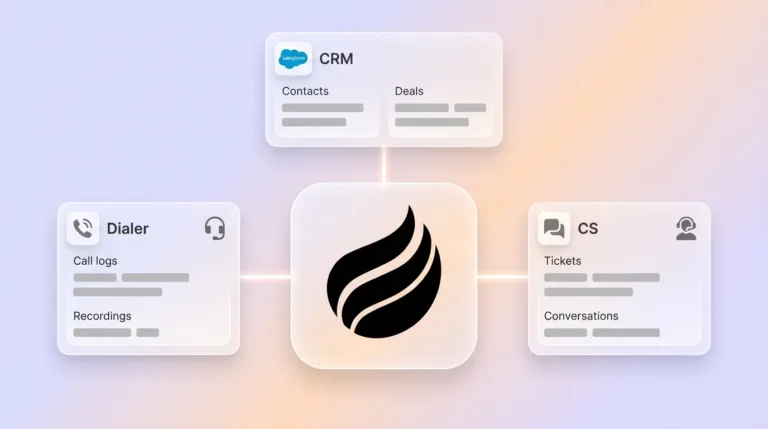
Coffee’s agent operates as a Companion App on top of existing Salesforce or HubSpot instances or as the engine behind a standalone CRM. In both models it performs the same core functions: auto-creating contacts from email and calendar data, logging every interaction without rep input, joining calls to transcribe and structure notes according to MEDDIC or BANT, and writing enriched records back to the system of record. The Pipeline Compare feature then visualizes week-over-week changes such as progressed deals, stalled opportunities, and new additions, which turns the weekly review from a data-gathering exercise into a strategic conversation.
Build people lists automatically with Coffee AI CRM Agent
Validation and Success Criteria for This 7-Step Process
A successfully implemented 7-step process produces measurable outcomes within two quarters. The metrics below work together as a simple scorecard, with forecast variance and pipeline hygiene as primary indicators and rep time saved as a supporting benefit.
Forecast variance: ±10% or better at the aggregate level, with ±5% as the excellence threshold per Forrester
CRM data completeness: 90% or more of open deals have all required fields populated at every stage
Stage accuracy: High rate of deals correctly staged, validated by manager review against exit criteria
Rep time saved: Coffee’s agent recovers 8–12 hours per rep per week that were previously spent on manual data entry
Small teams with 1–20 employees that have outgrown spreadsheets but find Salesforce or HubSpot too maintenance-heavy can deploy Coffee as a standalone AI-first CRM. The agent manages the system of record entirely, so founders and early sales hires avoid acting as data clerks.
Mid-market teams with 20–200 employees already committed to Salesforce or HubSpot deploy Coffee as a Companion App. A simple authentication allows the agent to sync data, enrich records, and write insights back to the primary CRM without disrupting existing workflows, quotas, or forecast roll-ups.
Teams with custom intelligence needs can use Coffee’s API access so revenue leaders script their own prompts and generate bespoke briefings from the agent’s data warehouse. This capability allowed one Coffee customer generating tens of millions in revenue to automate their entire weekly pipeline review without spreadsheets.
How long does it take to set up accurate pipeline forecasting in a CRM?
The stage definition and win-rate calculation work in Steps 1 and 2 typically takes two to four weeks, depending on how much historical closed-deal data exists and how many stakeholders must align on stage criteria. Connecting an AI agent like Coffee to an existing Salesforce or HubSpot instance takes minutes through authentication. Reliable weighted forecast numbers generally emerge after one full quarter of clean data collection, although teams with at least two quarters of historical data can back-test stage probabilities immediately and start producing trustworthy forecasts sooner.
Who owns pipeline forecasting, Sales or RevOps?
Ownership works best when split by function. RevOps owns the methodology, including stage definitions, win-rate calculations, the weighted formula, and the exception-report framework. Sales leadership owns the weekly review cadence and the decisions that come out of it, such as which stale deals to close, which at-risk deals need executive engagement, and whether the weighted total supports the committed number. The AI agent supports both functions by keeping data accurate without requiring either team to act as data administrators.
When should a team recalibrate stage win rates?
Teams should recalibrate win rates at minimum once per quarter. Recalibration also follows any significant change in go-to-market motion, pricing, product mix, or competitive landscape because historical win rates become unreliable when conditions shift. The recalibration process pulls all deals that were in each stage at the start of the prior quarter and calculates what percentage ultimately closed won, then compares that figure to the probability currently assigned in the CRM. Gaps greater than five percentage points warrant an update.
Can this process work for a team that does not yet have enough historical data?
Teams with fewer than two full quarters of closed-deal data should start with industry benchmarks as placeholder probabilities, such as Discovery at 10–15%, Proposal at 35–45%, and Negotiation at 65–75%, and treat them explicitly as assumptions rather than validated rates. The priority in the first two quarters is enforcing clear stage criteria and capturing complete activity data via an AI agent so that by quarter three there is enough clean historical data to calculate real win rates. Starting with an agent that automates data capture from day one compresses this timeline significantly compared with relying on manual rep entry.
Conclusion: Turn Pipeline Data into Predictable Revenue
Inaccurate pipeline forecasting rarely stems from reporting alone and usually reflects data quality and process gaps. The seven steps in this playbook address both issues: clear stage criteria prevent subjective deal advancement, historical win rates replace gut-feel probabilities, the weighted formula converts raw pipeline into a probability-adjusted projection, an AI agent enforces hygiene and activity logging without burdening reps, deal health signals surface risk before it reaches the forecast, exception-based weekly reviews focus manager attention where it matters, and weekly accuracy measurement creates the feedback loop that makes every subsequent forecast more reliable.
The only sustainable way to maintain the clean data this process requires is an agent that captures activity automatically, enforces required fields at every stage, and surfaces exceptions in real time. Coffee provides that capability whether deployed as a standalone CRM or as a Companion App on top of Salesforce or HubSpot.