Written by: Doug Camplejohn, CEO & Co-Founder, Coffee | Last updated: July 20, 2026
Key Takeaways from This Gong-to-CRM Workflow
- Every Gong call contains revenue intelligence that AI can extract and route into CRM fields without manual note-taking.
- A structured seven-step workflow turns raw call recordings into coaching actions, win/loss insights, and pipeline updates at scale.
- A clear insight taxonomy keeps AI outputs consistent, comparable, and directly actionable across every call.
- Automated coaching loops and CRM writes can reduce review time while improving win rates by 13–25% based on industry benchmarks.
- Teams can unlock these capabilities with Coffee and turn every Gong call into revenue action.
Why Gong Call Actions Change Sales Performance
Enterprise Account Executives recover meaningful selling time when AI Meeting Intelligence handles call notes and they only review and confirm. At the team level, this time savings compounds into more pipeline coverage and more conversations.
Sales teams using conversation intelligence typically achieve win-rate improvements of 13–25% according to multiple case studies and analyses. Yet most mid-market SaaS teams still rely on ad hoc manager call reviews. Manager sampling without AI covers only 1–5% of all conversations, while AI Meeting Intelligence reviews 100% of recorded calls with no additional headcount, which delivers coaching signal coverage at much higher scale.
Most sales teams review under 2% of recorded calls. A manager with 10 reps making 30–50 calls per week faces roughly 600–1,000 hours of recordings monthly, assuming typical 30-minute calls. This volume creates missed coaching moments and inaccurate pipeline data. Without AI, reps log only a fraction of call content into the CRM system, filtered through memory and limited time.
This volume problem reveals a deeper truth: the scaling limit of manual workflows is structural, not motivational. A repeatable, automated workflow provides the only reliable path to consistent analysis across every call.
Prerequisites for a Gong-to-CRM Insight Engine
- Active Gong access with call recording and transcription enabled
- CRM integration with Salesforce or HubSpot, with read/write permissions on Accounts, Contacts, Opportunities, and Activities
- Defined buyer personas and ideal customer profile (ICP) documented for AI context
- Stakeholder alignment on an insight taxonomy, including the specific fields to extract and their CRM destinations
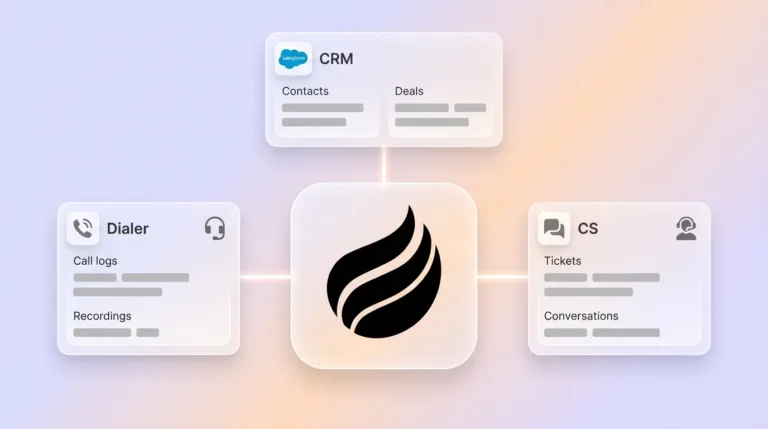
- An automation layer such as the Coffee Companion App, which supports Zapier integration for call recording ingestion
30-Day Roadmap to Launch This Workflow
- Week 1 – Taxonomy and baseline: Define your insight taxonomy (see table below). Tag the first 20 calls manually to validate field definitions. Establish baseline metrics for call-review time and CRM completion rate.
- Week 2 – Prompt library and ingestion: Build the five AI prompt templates below. Connect Coffee to Gong via Zapier. Validate that structured outputs write correctly to CRM fields, and spot-check 10 calls to confirm 85–90% field accuracy.
- Week 3 – Coaching loops live: Activate automated coaching summaries routed to managers via Slack. Begin scoring 100% of qualifying calls against your rubric. Measure coaching completion rate against the manual baseline.
- Week 4 – Win/loss patterns and CRM automation: Run the win/loss prompt across the last 90 days of closed deals. Activate automated CRM field updates for deal stage, risk score, and next-step commitments. Review improvements in pipeline accuracy.
7 Practical Steps to Turn Gong Recordings into Revenue
- Define your business questions.
Input: Revenue goals, sales methodology (MEDDIC, BANT, SPICED), and ICP definition. Decision: Select the insight categories that matter most, such as coaching signals, competitive intelligence, product feedback, or forecast accuracy. Output: A prioritized list of five to eight questions every call analysis must answer. Without this step, AI outputs stay generic and cannot be compared across calls. Arsalan Faysal states: “The call library is not the asset. The taxonomy is.”
Common pitfall: Teams skip this step and prompt AI without defined output fields, which produces narrative summaries that cannot be aggregated into patterns.
- Access transcripts and map them to your taxonomy.
Input: Gong call recordings filtered by CRM attributes such as deal stage, segment, ACV band, rep, and time window. Decision: Decide which call types require which taxonomy fields. Discovery calls require different must-capture fields than negotiation calls. Handoff: Coffee ingests the transcript via Zapier and applies your stored ICP and competitor context. Output: A structured transcript ready for AI extraction. Coffee’s Intelligence layer, launched in February 2026, lets teams define and store deep context on business model, product specifics, ICP, and competitors for tailored AI suggestions.
- Run AI prompt templates for deal, product, and competitive analysis.
Input: Structured transcript plus taxonomy definitions. Decision: Apply the correct prompt template for the call type. Handoff: Coffee’s AI agent processes the transcript and outputs structured JSON fields. Output: Extracted signals including objections, buying signals, competitor mentions, next-step commitments, talk ratio, and sentiment. See the five ready-to-copy prompts below. Write prompts so every call is evaluated identically, using clear output structures like rank, score, list, or theme plus evidence, which keeps per-call answers comparable.
Common pitfall: Incomplete transcripts caused by recording failures or participant opt-outs. Set a minimum transcript completeness threshold, such as 80% of call duration, before running analysis.
- Extract patterns from won versus lost deals.
Input: Closed-won and closed-lost calls from the last 90 days, filtered to a comparable cohort. Decision: Filter to 50–200 deals closed in the last 90 days, within one segment, and ideally with ACV above $20k–$25k to avoid noise from low-touch opportunities. Handoff: Run the win/loss prompt across the full cohort. Output: Ranked loss drivers with confidence scores and supporting call quotes. Teams that adopt AI-driven pattern extraction from call recordings gain a clearer view of repeatable win and loss drivers.
Common pitfall: Acting on samples smaller than 50 deals or trusting CRM loss reasons without checking actual call content.
- Create timestamped coaching action loops.
Input: Scored call summaries with flagged moments. Decision: Route calls that fall below threshold scores to manager review queues, and surface top-performer moments to the shared call library. Handoff: Coffee drafts structured coaching feedback for manager review before any rep receives it. Output: Timestamped coaching moments delivered to managers via Slack within 24 hours of the call. Sales representatives who receive coaching within 24 hours of a call are 2.5 times more likely to improve their performance compared to those with delayed feedback.
Common pitfall: Leaving coaching summaries unreviewed or unacknowledged. Track coaching completion rate as a core metric.
- Route insights automatically into CRM fields.
Input: Structured JSON output from Coffee’s AI extraction. Decision: Map each extracted field to the correct CRM property, such as MEDDIC fields, deal risk score, competitor involvement flag, next-step date, and sentiment score. Handoff: Coffee’s summary templates, released in November 2025, are customizable to match workflows and writable back to Coffee, HubSpot, or Salesforce. Output: Every opportunity record updates automatically after each call, with no manual keyboard entry. Gong’s AI Data Extractor can infer answers for MEDDIC categories from call recordings and automatically push updates to mapped CRM fields in HubSpot or Salesforce after each call.
- Validate outputs and refine your prompts.
Input: CRM field accuracy reports, coaching completion rates, and pipeline forecast variance. Decision: Spot-check 10 calls per week to confirm extraction accuracy remains above 85%. When accuracy drifts below that threshold, refresh prompt templates to match your evolving sales motion, typically on a quarterly cadence. Output: This validation cycle creates a continuously improving workflow with documented accuracy benchmarks and measurable revenue impact. Running the same constant prompt weekly on Gong call cohorts produces comparable results across periods because the analysis criteria remain fixed.
Get started with Coffee and deploy this workflow on top of your existing Salesforce or HubSpot instance.
Insight Taxonomy Table for Gong Call Analysis
| Insight Type | Definition | Example Gong Tracker | CRM Field Updated |
|---|---|---|---|
| Objections | Buyer-stated blockers categorized by theme: price, timing, authority, feature gap, competitor | Smart Tracker: “budget freeze,” “not in the roadmap,” “we use [competitor]” | Custom: Objection_Theme, Objection_Resolved (Y/N) |
| Buying Signals | Verbal commitments indicating purchase intent: budget confirmation, decision-maker engagement, implementation discussion | Tracker: “approved,” “our team would use,” “when can we start” | Opportunity Stage, Forecast_Category |
| Competitor Mentions | Specific competitor names raised by the buyer, including context such as replacing, evaluating, or comparing | Smart Tracker: named competitor list | Custom: Competitor_Involved, Competitive_Risk_Flag |
| Next-Step Commitments | Verbal agreements to a specific next action with a date, attendees, and agenda confirmed on the call | Tracker: “send me,” “let’s schedule,” “I’ll loop in” | Next_Activity_Date, Next_Step_Description |
| Talk Ratio | Percentage of speaking time per participant, with a discovery target of 40% rep and 60% buyer | Gong native Interaction metric | Custom: Rep_Talk_Ratio, Coaching_Flag |
| Discovery Depth | Whether the rep surfaced qualification information, including MEDDIC completeness, question rate, and multi-threaded discovery | Scorecard: MEDDIC adherence questions | MEDDIC fields (Metrics, Economic Buyer, Decision Criteria, etc.) |
| Sentiment | Buyer sentiment arc across the call, flagged as risk if sentiment drops in the final quarter | Gong native sentiment signal | Custom: Deal_Sentiment_Score, At_Risk_Flag |
Five Ready-to-Copy AI Prompts for Gong Calls
Apply each prompt to the relevant Gong transcript cohort. Request structured output, such as JSON or a bullet list with evidence quotes, so results stay comparable across calls.
- Deal Analysis: “Review this call transcript. Identify the current deal stage, the top three risks to advancement, any unresolved objections, and the buyer’s stated next step. For each finding, quote the exact buyer or rep language that supports it. Output as a structured list with a confidence score (High / Medium / Low) for each item.”
- Product Feedback: “Extract every mention of a product feature, capability gap, or workflow pain from this transcript. For each mention, record: the speaker role, the verbatim quote, whether it was framed as a blocker or a request, and the deal stage at time of call. Group results by theme.”
- Competitive Intelligence: “Identify every competitor mentioned in this transcript. For each competitor, record: who raised it (rep or buyer), the context (replacing, evaluating, or comparing), how the rep responded, and whether the objection was resolved. Flag any mention where the rep deflected rather than engaged directly.”
- Win/Loss Comparison: “For this call, identify the deal outcome (won, lost, or no-decision). List the top three reasons the deal moved that direction, quoting the buyer or rep moments that support each reason. Note any competitor mentions, pricing pushback, discovery gaps, or missing stakeholders. If the call does not clearly indicate outcome, state that explicitly. Output as CSV with columns: deal, outcome, primary driver, confidence score, evidence quote.”
- Coaching Moment Extraction: “Score this call on five dimensions: talk ratio (target: rep under 45%), discovery depth (were qualification criteria surfaced?), objection handling (were objections engaged or deflected?), next-step clarity (was a specific date and agenda confirmed?), and competitor positioning (was competitive context addressed directly?). For each dimension, assign a score of 1–5, quote the supporting moment with a timestamp, and draft one sentence of coaching feedback for the rep.”
Validation: How to Measure Workflow Success
- Call-review time: Track reduction in time spent on rep review-and-confirm.
- Coaching completion rate: Measure the percentage of flagged calls that receive documented manager feedback within 48 hours.
- CRM field completion rate: Compare CRM completion rates from automated call analysis against manual entry baselines.
- Pipeline forecast variance: Monitor reduction in the gap between forecast and actual close, driven by accurate next-step and stage data.
- Win rate trend: Track month-over-month changes in rep conversion rates to validate coaching impact.
- Manager time recaptured: Measure how AI-assisted review reduces manager time spent on call coaching.
Scaling This Workflow for Different Teams
Inbound teams should weight their taxonomy toward discovery depth and buying signal extraction, since inbound leads arrive with higher intent and qualification rigor becomes the primary coaching lever. Outbound teams should prioritize talk ratio, objection theme tracking, and competitor mention handling, where rep behavior in the first 60 seconds often correlates strongly with outcomes.
Teams with lower CRM maturity, such as incomplete field definitions or inconsistent stage criteria, should start with three to five high-confidence taxonomy fields before expanding. Revenue teams should define 3–5 high-impact conversation signals that reflect buying intent in their sales motion before mapping them to CRM fields.
Teams ready to move beyond per-call analysis can use Coffee’s Pipeline Compare feature to visualize week-over-week changes across all opportunities. The view highlights progressed deals, stalled opportunities, and new additions without manual CSV exports. Pipeline reviews then shift from interrogation sessions to strategic discussions grounded in call-derived data.
Get started with Coffee to activate Pipeline Compare and automated Gong ingestion on your existing CRM.
Frequently Asked Questions
How long does it take to set up this workflow?
Initial connectivity between Gong, your CRM, and Coffee can be operational within a few days using the Zapier integration. The first week focuses on defining your taxonomy and validating field mappings against a sample of 10–20 calls. Full production use with automated CRM writes and coaching loops typically goes live by the end of Week 3. The 30-day roadmap above provides week-by-week milestones for teams starting from scratch.
Who owns this workflow within the organization?
RevOps owns taxonomy definition and CRM field mapping. Sales Enablement or the Head of Sales owns coaching loop design and scorecard criteria. Individual reps handle day-to-day operation by reviewing Coffee’s automated summaries and confirming CRM updates, which takes about 2–3 minutes per call. The workflow spreads responsibility so no single team carries the full operational burden.
What happens to call data and how long is it stored?
Gong retains call recordings and transcripts according to your organization’s configured retention policy, typically 12–24 months. Coffee processes transcript data to generate structured outputs and writes those outputs back to your CRM. Coffee does not use your call data to train public AI models. Retention of CRM field data follows your existing Salesforce or HubSpot data governance policies.
Is Coffee compliant with SOC 2 Type 2 and GDPR?
Yes. Coffee is SOC 2 Type 2 certified and GDPR compliant. Data processed by the Coffee Agent is not used to train public models. Teams in regulated industries or with specific data residency requirements can request Coffee’s security documentation during the trial process.
How does the workflow evolve as the team grows?
The taxonomy and prompt library should be reviewed quarterly as your ICP, competitive landscape, and sales methodology evolve. As headcount grows, Coffee’s seat-based pricing model scales linearly, since you pay for human seats and the Agent’s labor is included without extra metering on AI usage or processes. Teams that add new CRM fields, sales stages, or product lines can update Coffee’s Intelligence layer with new context, and the Agent applies that context to all subsequent call analysis automatically.
Conclusion: Turn Every Gong Call into Revenue Action
The seven-step workflow above, from defining business questions through automated CRM routing and iterative validation, creates a complete closed-loop system for converting Gong recordings into revenue-driving actions at scale. The insight taxonomy table and five ready-to-copy prompts give RevOps and enablement teams the structural components they need to deploy this workflow without building from scratch.
Manual transcript review acts as a scaling constraint rather than a strategy. B2B companies that incorporate AI sales coaching programs into their go-to-market operations can see improved revenue outcomes compared to those that do not. The automation layer that enables this, including ingesting Gong transcripts, extracting structured signals, and writing back to Salesforce or HubSpot, is exactly what Coffee is built to handle.
Get started with Coffee and convert every Gong call into a CRM update, a coaching action, and a revenue signal, without adding headcount or manual review hours.