Written by: Doug Camplejohn, CEO & Co-Founder, Coffee | Last updated: July 9, 2026
Key Takeaways
- Conversational intelligence platforms fall into two groups: passive recorders that only transcribe and active agents that update CRM records automatically.
- Small teams of 1–20 should focus on automation depth, low onboarding effort, full phone and meeting coverage, native CRM integration, and pricing under $100 per seat each month.
- Enterprise tools like Gong and Chorus impose high minimums and long contracts, while Avoma, Fathom, and HubSpot differ in automation level and total cost of ownership.
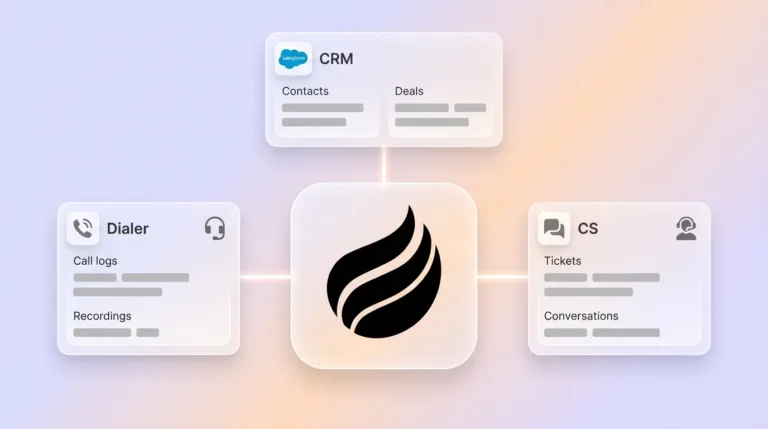
- Coffee stands out as the only active-agent solution here that unifies calls, emails, and calendar data into accurate CRM records without RevOps staff or manual entry.
- Teams ready to remove data-clerk work and keep pipelines clean should get started with Coffee today.
How We Evaluated Small-Business Conversational Intelligence Tools
Six criteria separate tools that genuinely serve teams of 1–20 from those that merely tolerate them.
- Data quality and automation depth: The strongest platforms write structured data back to the CRM automatically instead of leaving a transcript for the rep to process.
- Implementation effort: Most platforms begin capturing calls within days to weeks, yet onboarding complexity and hidden setup work vary widely.
- Phone vs. meeting coverage: Tools need speech analytics on phone and audio conversations plus video and text channels to deliver full coverage.
- CRM integration without manual work: Platforms that automatically update CRM records after sales calls remove the post-call data-entry loop that costs reps hours each week.
- Pricing under $100/month per seat: Enterprise platforms such as Gong and Chorus impose 10–25 seat minimums (Gong typically 15), require annual contracts, and do not publish onboarding timelines, which many small teams cannot absorb.
- Long-term data hygiene: Systems that rely on human entry degrade over time, while agent-driven platforms maintain record quality continuously without RevOps intervention.
Side-by-Side Platform Comparison for Small Teams
The table below shows how each platform’s automation approach and pricing align with these six criteria so you can match tools to your budget and workflow.
| Platform | Automation Depth | Pricing (2026) | Best For |
|---|---|---|---|
| Avoma | Passive recorder with CRM sync add-on, notes and scorecards need manual review before logging | Avoma Startup base is $19/user/month (annual), Conversation + Revenue Intelligence add-ons push totals to about $77/user/month | Teams wanting all-in-one meeting notes and scorecards on a flexible contract |
| HubSpot Sales Hub | Native CRM integration, conversation intelligence available at higher tiers | Free tier plus Starter, Professional, and Enterprise tiers with varying per-seat pricing | Teams already on HubSpot CRM that will pay for native call intelligence |
| CloudTalk | VoIP-native call recording and transcription, CRM sync limited mainly to structured call metadata | Custom pricing, not publicly listed for conversation intelligence tiers | Teams prioritizing inbound and outbound phone volume over meeting intelligence |
| Fathom | Passive recorder with free unlimited transcription, CRM sync and AI scorecards require the Business plan ($34/month per user) | Free plan, Premium $19/month, Team $19/month per user (2+ users), Business $34/month per user (2+ users), with annual discounts available | Solo founders or very small teams needing free transcription with optional CRM push |
| Coffee | Active agent that captures calls, emails, and calendar data, then writes enriched records, summaries, and pipeline changes to CRM without human input | Seat-based pricing with agent labor included, see coffee.ai/pricing for current rates | Teams of 1–20 that need unified call, email, and CRM intelligence without manual entry or RevOps staff |
Setup and Onboarding Effort by Platform
The enterprise tools mentioned earlier set a high bar for complexity. The platforms in this comparison handle setup very differently.
- Avoma: Self-serve setup through calendar integration. The conversation intelligence add-on needs separate activation and per-seat billing changes, and you must manage recorder seats manually while viewer seats remain free.
- HubSpot Sales Hub: Native setup for existing HubSpot users. Conversation intelligence requires higher tiers, which trigger a full contract and onboarding cycle that often feels heavy for a sub-20-person team.
- CloudTalk: Requires VoIP number porting or provisioning. CRM integration setup varies by connector, and the phone-first design means you still need another tool for video meeting coverage.
- Fathom: Platforms like Fathom enable deployment in minutes with a browser extension. CRM sync comes later as a separate configuration step and does not capture email or calendar data automatically.
- Coffee: Authentication to Google Workspace or Microsoft 365 activates the agent immediately. The agent then auto-creates contacts, logs activities, and joins meetings without extra configuration or RevOps help.
Data Capture, Maintenance, and Pipeline Accuracy
Post-call automation determines whether your CRM stays accurate or slowly decays. Passive tools output a transcript and summary, and the rep decides what reaches the CRM. Active agents write structured data to the CRM on their own.
AI-generated follow-ups from call transcripts can reclaim significant rep-hours per week. Published deployments show a 40% reduction in rep admin time for research, CRM updates, and follow-up drafting, which translates to roughly 14 hours per week for a rep who spends 35 hours on these tasks.

Sybill usage data confirms that reps can reclaim up to 14 hours per week when tools remove manual data entry instead of just trimming it. Coffee’s agent operates at this level by unifying calls, emails, and calendar data into one coherent CRM record continuously, not only after scheduled meetings.
Conversation intelligence platforms with native CRM integrations reduce manual data entry by automatically connecting conversation insights to sales workflows and eliminating duplicate data entry. Coffee extends this with a built-in data warehouse that tracks historical pipeline changes week over week, so the Pipeline Compare feature surfaces stalled deals and progressed opportunities without manual CSV exports.
Usability for Reps and Visibility for Managers
Small sales teams of 1–10 people see the fastest ROI when calls auto-log and deal risks appear without a RevOps hire. That payoff depends on whether reps trust the system enough to stop keeping parallel notes and spreadsheets.
Passive recorders such as Fathom and Avoma reduce transcription work but keep reps in the data-clerk role. Reps still choose which notes belong in the CRM and must trigger sync manually. A sales manager with 10 reps making five calls per day faces 250 calls per week, and reviewing even 10% at real speed takes roughly 8–12 hours weekly. Coffee’s agent highlights AI-flagged moments and pipeline changes in a structured view so managers review insights instead of raw recordings.

Integration Complexity and Total Cost of Ownership
HubSpot’s conversation intelligence lives in higher tiers, so a five-person team often pays enterprise-level prices before considering other Sales Hub features. Avoma’s Conversation Intelligence add-on at $29 per user per month (annual) or $35 per user per month (monthly) feels more accessible yet still requires a separate CRM for pipeline management, which adds stack complexity. Tools with deeper automation and pipeline integration typically exceed $100 per user per month. Coffee’s seat-based model, where agent labor comes included with no extra metering, is structured for sub-$100/month budgets at small-team scale.
Get started with Coffee to review transparent seat-based pricing with no platform fees or seat minimums.
Best-Fit Scenarios by Team Size and Tech Stack
Different starting points call for different configurations.
- Solo founders: Fathom’s free tier delivers unlimited transcription at zero cost. Coffee’s Standalone CRM fits better when you also need pipeline tracking, email capture, and contact enrichment in one place instead of stitching together several tools.
- 5–20 person teams without an existing CRM: Coffee’s Standalone CRM runs the agent as the system of record and replaces separate tools for enrichment, recording, and forecasting.
- 5–20 person teams on Salesforce or HubSpot: Coffee’s Companion App connects to the existing instance and writes enriched call, email, and calendar data back automatically, which improves adoption and data quality without swapping out the CRM.
- Teams prioritizing phone volume over video meetings: CloudTalk handles inbound and outbound call recording natively, and teams that also need video meeting intelligence will pair it with an additional tool.
Operational Risks and Long-Term Data Hygiene
Traditional CRM systems ask users to log interactions through dashboards and forms after the fact, which encourages low adoption and weak data quality over time. Teams then build shadow CRMs in spreadsheets and Notion while the official CRM becomes a reporting shell.
Passive recorders speed up note-taking but do not fix this entry problem. As teams grow beyond 20 seats, the gap between what was recorded and what was logged compounds. Agent-driven platforms maintain data hygiene continuously, so scaling to larger teams or more complex CRM setups becomes less painful.
HubSpot Sales Hub and Salesforce Einstein Conversation Insights offer native CRM conversation intelligence, yet both require significant per-seat investment and assume CRM maturity that most sub-20-person teams have not reached.
Decision Framework: Matching Platforms to Your Team
Your choice depends on three factors: whether you already have a CRM, how much manual data entry your reps handle today, and whether your budget can support per-seat costs above $50 each month.
- Start with teams that have no CRM and need unified call, email, and pipeline intelligence in one place. Coffee Standalone CRM fits this group.
- Next consider teams running Salesforce or HubSpot with poor data quality and low adoption. Coffee Companion App improves hygiene inside the existing CRM.
- Then look at teams that only need free transcription and accept manual CRM updates. Fathom’s free tier serves them well.
- Some teams want meeting notes and scorecards with flexible per-seat pricing and can manage CRM sync separately. Avoma Starter suits that scenario.
- Finally, teams already on HubSpot that treat conversation intelligence as a secondary need can use HubSpot Sales Hub Professional, knowing that full conversation intelligence requires the Enterprise upgrade.
Frequently Asked Questions
How long does it take to implement a conversational intelligence platform for a small team?
Implementation timelines range from minutes to weeks depending on platform type. Passive recorders like Fathom activate through a browser extension and begin recording immediately. Agent-driven platforms like Coffee connect through a single authentication to Google Workspace or Microsoft 365 and start capturing contacts, activities, and meetings automatically from that point. Enterprise tools with custom onboarding can require four to eight weeks before the first call is analyzed, which becomes a meaningful cost for a team of fewer than 20 people.

Do small teams need dedicated RevOps staff to manage these platforms?
Passive recorders do not need RevOps staff to operate, yet they still rely on reps to act as data clerks who review summaries and decide what reaches the CRM. Agent-driven platforms remove that burden by handling data capture and CRM updates autonomously. Coffee is built so a founder or head of sales can deploy and manage the agent without a dedicated operations hire. The agent covers enrichment, activity logging, meeting summaries, and pipeline tracking without ongoing configuration.
Is my call and email data secure on these platforms?
Security standards differ by vendor. Coffee is SOC 2 Type 2 and GDPR compliant, and customer data does not train public AI models. When you evaluate any conversational intelligence platform, confirm SOC 2 compliance, data residency policies, and whether conversation data feeds model training. Highly regulated industries such as healthcare and finance should run an additional security review before deployment.
What is the realistic total monthly cost for a five-person team?
Costs for a five-person team vary widely by platform. Fathom’s Business plan runs $34/month per user, totaling $170/month for five seats with CRM sync included. Avoma with Conversation and Revenue Intelligence add-ons can reach about $385/month for five seats. HubSpot’s higher tiers bring substantial costs for five seats. Coffee’s seat-based pricing includes agent labor for data entry, enrichment, meeting management, and pipeline intelligence without extra metering fees, and current pricing appears at coffee.ai/pricing.
Conclusion: Turning Conversations into Accurate Pipeline Insights
Passive recorders solve the transcription problem but not the data-quality problem. For small sales teams where every rep hour matters and no RevOps staff exists to enforce CRM hygiene, the gap between a tool that records and a tool that acts separates a useful archive from an accurate pipeline.
Avoma and Fathom work well for teams with modest budgets and tolerance for manual CRM steps. HubSpot’s conversation intelligence is powerful yet priced for organizations with enterprise budgets. Coffee is the only platform in this comparison that deploys an active agent to unify calls, emails, and CRM records automatically at pricing designed for teams of 1–20, without a dedicated operations function to preserve data quality over time.
Get started with Coffee and replace manual data entry with an agent that keeps your pipeline accurate from the first call forward.