Written by: Doug Camplejohn, CEO & Co-Founder, Coffee | Last updated: July 1, 2026
Key Takeaways for Gong Transcript Automation
- Manual Gong transcript review wastes 8–12 hours per rep each week and blocks consistent coaching, product insight, and CRM updates.
- Five automation methods exist, ranging from Gong-native scorecards to fully autonomous AI agents that remove all manual data entry.
- Native Gong tools and simple exports still require manual CRM uploads, while Zapier/n8n and custom scripts add complexity and maintenance overhead.
- Coffee’s autonomous agent ingests transcripts, applies MEDDICC or similar frameworks, and writes clean records directly into Salesforce or HubSpot.
- Teams ready to reclaim selling time can start with Coffee and scale transcript analysis across every team.
The Problem: Why Transcript Analysis Matters
71% of sales reps report spending too much time on data entry, leaving only 35% of their working hours for actual selling. Manual transcript review compounds that burden. A rep who listens back to three calls per day, tags MEDDICC elements, and then re-enters findings into a CRM can lose 8–12 hours every week before a single deal advances.
The downstream effects stack up quickly. Coaching conversations lack evidence. Product teams miss recurring objections. Forecast calls rely on gut feel rather than structured deal data. Before you implement any of the five methods below, confirm three readiness requirements. You need Gong API or export access, a connected CRM such as Salesforce or HubSpot, and a defined qualification framework such as MEDDICC or a buyer-persona scorecard.
Method 1 – Gong Native AI Search and Scorecards
Inputs: Active Gong license with AI features enabled, defined scorecard criteria.
Steps: Navigate to Gong's Help Center and configure Smart Trackers for keywords tied to your qualification framework. Build a scorecard under Coaching > Scorecards, map each criterion to a tracker, and assign it to a call type. Gong scores calls automatically as they are recorded.
Outputs: Per-call scores, keyword hit counts, and aggregate team dashboards inside Gong.
Common Pitfall: Scorecards surface scores inside Gong but do not push structured data to the CRM. A manager still exports or manually copies findings into Salesforce or HubSpot opportunity fields.
Method 2 – Bulk CSV/JSON Export with Google Sheets or Gemini
Inputs: Gong export permissions, Google Workspace account, Gemini Advanced or equivalent LLM access.
Steps: From Gong's Settings > Data Export, schedule a recurring transcript export in JSON format. Import the file into Google Sheets using the ImportJSON formula or a simple Apps Script. Pipe transcript text into a Gemini prompt (see the template section below) to extract MEDDICC fields, then paste outputs into CRM records manually or via a Sheets-to-HubSpot connector.
Outputs: Structured MEDDICC fields in a spreadsheet, ready for manual CRM upload.
Common Pitfall: Bulk exports are batched, not real-time. A deal can sit for 24–48 hours without updated CRM notes, which degrades forecast accuracy during fast-moving cycles.
Get started with Coffee — eliminate the manual paste step entirely.
Method 3 – Zapier or n8n Workflows for Near-Real-Time Updates
Inputs: Gong webhook or polling trigger, Zapier or n8n account, CRM API credentials.
Steps: In Zapier, create a Zap triggered by a new Gong call. Add an OpenAI or Anthropic action to summarize the transcript using a structured prompt. Map the JSON output fields to CRM properties such as deal stage, next steps, and economic buyer, then push them via a HubSpot or Salesforce action step. In n8n, the same logic runs on a self-hosted node for teams with data-residency requirements.
Outputs: Near-real-time CRM field updates triggered by call completion.
Common Pitfall: No-code workflow builders handle structured fields well but break on unstructured or ambiguous transcript content. A rep who discusses pricing informally may not trigger the correct field mapping, which leaves gaps in deal records.
Method 4 – Gong API Custom Scripts for Full Control
Inputs: Gong API credentials (OAuth 2.0), Python or Node.js environment, CRM API access.
Steps: Authenticate against the Gong API using the /v2/calls/transcript endpoint to retrieve full transcript objects. Parse speaker turns, chunk text by topic, and pass chunks to an LLM with a MEDDICC extraction prompt. Serialize the response as JSON and write it to CRM objects via the Salesforce REST API or HubSpot Engagements API.
Outputs: Fully automated, field-level CRM updates with the source transcript attached as a note.
Common Pitfall: Custom scripts require ongoing engineering maintenance. API schema changes on either the Gong or CRM side can break pipelines silently, and most RevOps teams lack the bandwidth to monitor and repair them continuously.
Method 5 – Autonomous AI-Agent Workflows with Coffee
Inputs: Coffee Companion App authenticated to Salesforce or HubSpot, Gong connected via Coffee's Zapier integration, available since January 2026.
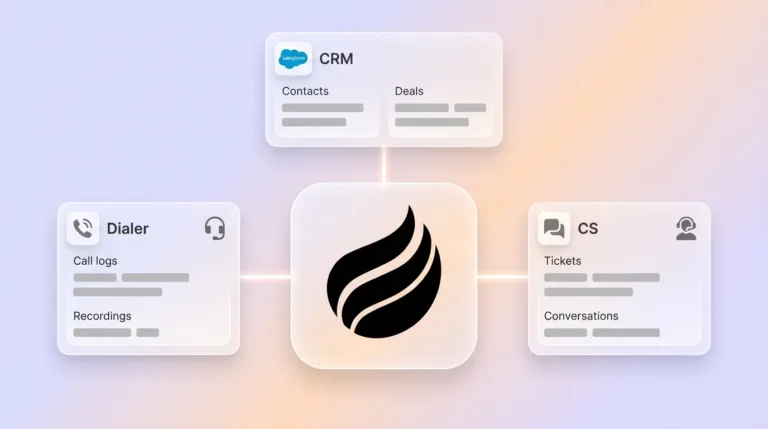
Steps: Connect Gong to Coffee through the integrations panel. Coffee's agent receives the completed call recording and transcript automatically. The agent applies your configured qualification framework such as MEDDICC, BANT, or SPICED using customizable summary templates released in November 2025 that define the exact output format. The agent then writes structured fields, coaching flags, and next-step tasks directly to the corresponding Salesforce opportunity or HubSpot deal record without any human action. Coffee's Intelligence layer, launched in February 2026, allows teams to store ICP definitions, competitor context, and product specifics so every extraction is calibrated to the business, not a generic prompt.
The table below compares the three most practical automation approaches on the factors that keep your CRM current without manual work.
AI Agent Comparison Table
| Method | Time-to-Insight | CRM Write-Back | Unstructured Data Handling |
|---|---|---|---|
| Gong Native AI | Minutes (in-Gong only) | None (manual export required) | Keyword matching only |
| Zapier / n8n | Near real-time | Structured fields via mapped actions | Limited, breaks on ambiguous text |
| Coffee Agent | Minutes post-call | Autonomous write-back to Salesforce or HubSpot | Full transcript ingestion with contextual LLM extraction |
Ready-to-Use Templates for Gong Transcript Workflows
The three templates below cover the most common transcript-analysis workflows. Use the MEDDICC prompt when you build a custom script or LLM integration in Methods 2 and 4. Apply the coaching scorecard inside Gong's native interface in Method 1 or as a secondary analysis layer in Coffee. Reference the JSON schema when you map LLM outputs to CRM fields in Zapier, n8n, or custom code.
MEDDICC Extraction Prompt: “You are a sales analyst. Given the following call transcript, extract: Metrics (quantified business impact), Economic Buyer (name and title), Decision Criteria (stated requirements), Decision Process (steps and timeline), Identify Pain (core problem), Champion (internal advocate), and Competition (mentioned alternatives). Return each as a labeled JSON field. Transcript: [INSERT TEXT]”
Coaching Insight Scorecard: Score each call 1–5 on: discovery depth, objection handling, next-step commitment, competitive positioning, and talk-to-listen ratio. Flag any call scoring below 3 on two or more criteria for manager review.
Pipeline-Update JSON Schema: {"deal_id": "", "economic_buyer": "", "pain_confirmed": true/false, "next_step": "", "next_step_date": "", "competitor_mentioned": "", "meddicc_score": 0–7, "coaching_flag": true/false}
Once you implement any of the five methods above, validation becomes the gate that confirms your automation improves CRM hygiene instead of moving bad data faster.
Validation and Success Metrics
Data-quality checks should run weekly. Verify that every closed call has a populated economic buyer field, a confirmed next step with a date, and at least one MEDDICC element logged. Adoption is confirmed when CRM field completeness exceeds 90% without manager prompting. The primary operational outcome is recovering the 8–12 hours per rep per week currently lost to manual review and data entry, which returns directly to pipeline-generating activity.
Scaling and Variations Across Team Sizes
Small teams under 10 seats benefit most from Methods 1 through 3, which require no engineering resources. At low call volumes, the manual CRM upload step in these methods remains tolerable. Once a team crosses 50 calls per week, that manual step becomes the bottleneck, which makes Method 5's autonomous write-back the most practical path.
Within either tier, your sales motion shapes which fields matter most. Inbound teams prioritize coaching scorecards and talk-to-listen ratios to improve qualification speed. Outbound teams prioritize MEDDICC completeness and competitor intelligence to manage longer, more complex cycles.
Product and marketing teams can route the same Coffee-extracted transcripts to a competitor-intelligence board or a product-feedback log. This approach turns every sales call into a cross-functional signal without additional tooling.
Get started with Coffee and scale transcript analysis across every team.
Frequently Asked Questions
How long does it take to set up Coffee with Gong?
Most teams complete the initial connection in under an hour. Authenticating Coffee to Salesforce or HubSpot takes roughly 10 minutes. Connecting Gong via the Zapier integration adds another 15 minutes. The highest-value setup step, which is populating Coffee's Intelligence layer with your ICP, qualification framework, and competitor context, takes 20 to 30 minutes and directly determines the quality of every subsequent extraction. Teams that complete all three steps on day one see structured CRM records appearing automatically after the first post-setup call.
Is Coffee SOC 2 and GDPR compliant?
Yes. Coffee is SOC 2 Type 2 certified and GDPR compliant. Call transcript data processed by the Coffee agent is not used to train public AI models. For teams in regulated industries or with data-residency requirements, Coffee's security documentation is available on request before any commitment.
How is Coffee priced?
Coffee uses seat-based pricing. You pay per human seat, and the agent's labor such as transcript ingestion, CRM write-back, enrichment, and pipeline intelligence is included without usage metering on LLM calls or workflow runs. There are no per-transcript fees or API overage charges. Full pricing details are available at coffee.ai/pricing.
What happens when a team grows beyond 20 seats?
Coffee's Companion App model is designed for small to mid-market teams and scales with seat additions without architectural changes. Teams that grow into more complex Salesforce configurations such as custom objects, multi-currency, and territory management are supported through Coffee's deep understanding of Salesforce and HubSpot integrations, including quotas, forecasting rules, and required fields. Very large enterprises with fully custom CRM builds are outside Coffee's current ICP, but mid-market teams at 20 to 200 seats are a core use case.
Conclusion
The five methods above form a clear automation ladder. Native Gong scorecards surface in-platform insights. Bulk exports enable LLM analysis in spreadsheets. Zapier and n8n push structured fields to the CRM in near real-time. Custom API scripts deliver full automation with engineering overhead. Coffee's autonomous agent then closes the loop entirely, delivering the zero-touch CRM updates described in Method 5.
Only Coffee removes data entry at every stage of that loop. That recovered time, the 8–12 hours per rep mentioned earlier, returns directly to selling.