Written by: Doug Camplejohn, CEO & Co-Founder, Coffee | Last updated: June 18, 2026
Key Takeaways for 2026 RevOps Teams
- B2B revenue teams in 2026 typically choose among waterfall enrichment stacks, single-vendor databases, and agent-orchestrated automation to keep CRM data accurate.
- Waterfall stacks deliver high coverage but demand ongoing RevOps effort to manage source priority, conflicts, and multiple vendor contracts.
- Single-vendor databases simplify integration but face geographic coverage limits and still rely on manual refresh cycles.
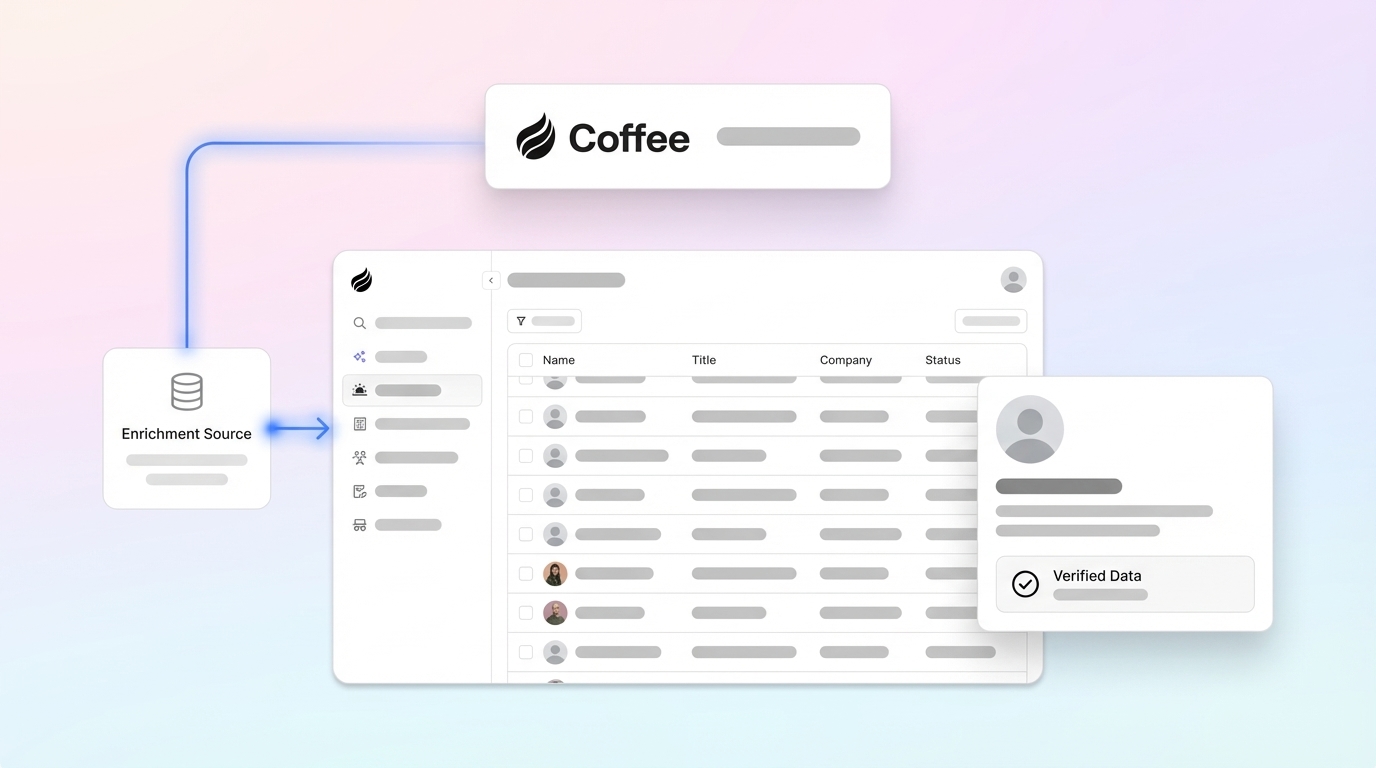
- Coffee’s Companion App writes verified contact and company data directly into HubSpot or Salesforce on a continuous basis, removing manual enrichment work.
- Teams ready to remove ongoing admin burden can start your free Coffee trial today.
How We Evaluate CRM Accuracy Tools
Clear evaluation criteria keep enrichment decisions grounded in long-term CRM accuracy, not just a strong first import.
- Data match-rate accuracy: The percentage of target contacts for which the tool returns a verified field value. Real-world match rates often sit below vendor marketing claims, so plan for the best realistic single provider.
- Email verification quality: High email validity rates protect deliverability and sender reputation.
- CRM-native sync depth: The tool should write enriched data back to HubSpot or Salesforce natively, including field mapping, update logic, and workflow triggers, without manual exports.
- Implementation effort: Time and technical skill required to go from contract to live enrichment.
- Ongoing administrative burden: RevOps hours per month required to maintain accuracy after go-live.
- Refresh cadence support: B2B contact data decays at approximately 2% per month (22–28% annually), so the tool must support scheduled re-enrichment, not just one-time imports.
- Total cost of ownership (TCO): Per-record fees plus the hidden cost of RevOps time. The real cost of waterfall enrichment includes RevOps time spent managing source priority, reconciling data conflicts, and handling vendor relationships, not just lookup fees.
2026 B2B Enrichment Tools Side-by-Side
| Criterion | Waterfall Stacks | Single-Vendor Databases | Coffee Agent |
|---|---|---|---|
| Data match-rate accuracy | High with multi-provider waterfall | Varies for single provider | Continuous agent enrichment via licensed data partners, no static match-rate ceiling |
| Email verification quality | High with cross-validation across multiple providers | Varies by provider and region | Verified via licensed partners, written directly to CRM record |
| CRM-native sync depth | Requires custom field mapping and update logic per provider | Native connectors available, single integration point | Native HubSpot and Salesforce write-back, no manual mapping required |
| Implementation effort | High, with source priority rules, API contracts, conflict logic | Medium, with one integration, field mapping, update rules | Low, with single authentication and immediate enrichment |
| Ongoing admin burden | High, with ongoing source management, conflict reconciliation, rate-limit troubleshooting | Low to medium, with periodic contract and coverage reviews | Zero, because the agent handles enrichment autonomously |
| Refresh cadence support | Manual scheduling required across providers | Vendor-controlled update cycles, re-enrichment requires manual trigger or workflow | Continuous, with re-enrichment on activity signals and scheduled cadences |
| Total cost of ownership | Unpredictable, with per-data-point charges plus RevOps overhead that scale with volume | Predictable subscription, though geographic coverage gaps may require supplemental tools | Seat-based pricing, with agent labor included at no additional metering cost |
How Each Enrichment Model Performs
Setup. Waterfall stacks carry the highest setup cost. Teams must create and maintain rules for source priority ordering, handle conflicting values across providers, manage multiple APIs or contracts, and troubleshoot rate limits and failures. Single-vendor databases reduce this to one integration but still require field mapping and update-logic decisions. Coffee’s Companion App uses a single authentication to HubSpot or Salesforce, and the agent begins enriching records immediately.
Data capture and maintenance. Once setup is complete, the next challenge is maintaining data quality over time. Waterfall enrichment can fill more records than single-source providers, but that coverage advantage erodes without ongoing maintenance. Significant portions of B2B database records become outdated each year, so any static enrichment run degrades rapidly. Coffee’s agent re-enriches continuously and directly addresses this decay.
Frontline usability. Sales reps experience enrichment quality through CRM records. When enrichment runs as a separate workflow managed by RevOps, reps see stale fields between refresh cycles. An agent that writes to the CRM in real time keeps data current without any action from the rep.
Manager visibility. Waterfall stacks lack a single source of truth, which makes it harder to trace data origins or identify which provider caused an error. Single-vendor databases offer one audit trail. Coffee’s agent logs enrichment activity directly in the CRM record, so managers see full provenance.
Integration complexity. HubSpot enrichment setup requires connecting external providers, configuring match rules based on domain, email, or company name, and defining field update logic such as overwrite, append, fill-blank-only, or timestamp-based priority to protect historical data. This complexity applies to both waterfall and single-vendor approaches. Coffee’s agent handles this logic internally.
Long-term scalability. Most mid-market organizations eventually consolidate to a single provider to reduce operational drag as volume scales. Agent-orchestrated enrichment scales with seat count rather than record volume, which keeps TCO predictable.
HubSpot Enrichment: Where Coffee Fits
HubSpot’s native Company Insights enrichment supplies only basic firmographics such as industry, employee count, revenue range, and HQ location when a company domain is recognized, but lacks technographics, intent signals, verified contacts, and deeper firmographics required for accurate scoring and routing. Teams that rely only on native enrichment face significant coverage gaps.

For HubSpot users running waterfall stacks, common implementation mistakes include relying on a single provider for coverage, failing to validate records before workflow triggers fire, and neglecting ongoing monitoring of match rates and attribute drift. These issues steadily degrade scoring and routing accuracy.
Coffee’s Companion App is purpose-built for HubSpot. After a single authentication, the agent enriches contacts and companies, logs activity, and writes verified data back to HubSpot properties without requiring RevOps to configure cascade logic or manage provider contracts. For SMB-to-midmarket HubSpot teams with limited RevOps bandwidth, this path delivers sustained CRM accuracy with minimal maintenance.

Salesforce Enrichment: Options and Tradeoffs
Salesforce implementations introduce additional complexity. Integration problems in CRM setups are almost never technical, but instead arise from data mapping problems caused by two systems calling the same concept by different names or syncing data in both directions without a clear source of truth. Enrichment tools that write to Salesforce must respect required fields, validation rules, and object relationships that vary by org.
Single-vendor databases such as ZoomInfo GTM Studio use a parallel waterfall approach that queries 25+ third-party vendors simultaneously and applies Intelligent Scoring to return the highest-confidence match with no incremental enrichment charges. This model works well for large North American-focused Salesforce orgs with dedicated RevOps resources.
Coffee’s Companion App for Salesforce handles the integration depth that newer AI CRM tools often miss, including quotas, forecasting fields, required fields, and custom object relationships. The agent enriches records and writes data back without triggering validation errors, which makes it a practical choice for mid-market Salesforce teams that want enrichment without a dedicated administrator.
See Coffee’s native Salesforce integration in action in your own org.
Waterfall Setup in 2026: Five-Step Checklist
Teams that still choose a waterfall stack can follow this five-step checklist, which reflects current best practices.
- Audit your CRM data model. Most mid-market companies discover that 30–50% of their contact records are either duplicates or missing key fields before enrichment begins. Resolve duplicates and define required fields first.
- Select and rank providers by coverage zone. Use firstname, lastname, and company domain as the primary match keys. Assign providers based on geographic strength, such as prioritizing a North American-strong source for US records and a European specialist for EU contacts.
- Configure field update logic. Decide whether each field uses overwrite, append, fill-blank-only, or timestamp-based priority. Failing to define update logic causes data conflicts that degrade scoring and routing accuracy over time.
- Run a test batch before full deployment. Use a test import of 500 sample records to validate associations and field mapping before the full migration.
- Establish governance and monitoring. Assign a named owner for source priority reviews. Give this owner alert thresholds for match-rate drops to catch provider degradation early, and documented conflict-resolution rules to keep decisions consistent as volume scales. Teams scaling beyond a few thousand records per month often find the operational burden of waterfall management outweighs cost savings, so monitor this ratio quarterly.
30/90-Day Refresh Playbook for Any Stack
B2B contact data decays at approximately 2–2.5% per month, so a CRM enriched in January will contain noticeably stale records by March without intervention. The following cadence works across enrichment approaches.
30-day actions. Run email validity checks on all contacts added in the prior 30 days. A 96.8% baseline email deliverability accuracy is achievable when contacts are pre-verified through a dedicated verification tool before enrichment runs. Flag any records with email validity below 90% for re-enrichment. Review match-rate reports from each provider and escalate any source delivering below 75%.
90-day actions. Re-enrich all active pipeline contacts. Given the decay rate mentioned earlier, this cadence keeps data usable. Audit job title and company fields specifically, because they change frequently. Reconcile any conflicting values introduced by waterfall providers during the quarter.
For Coffee Companion App users, the agent executes this playbook automatically. The 30- and 90-day manual steps above apply to teams running waterfall or single-vendor approaches.
Which Enrichment Model Fits Your Team Size
Early-stage teams (1–20 reps). Traditional waterfall enrichment makes sense for early-stage teams doing a few hundred lookups per month or experimenting before committing to a primary vendor. A single-vendor database with a HubSpot or Salesforce native connector offers the lowest-friction starting point. Coffee’s Standalone CRM is purpose-built for this segment and removes the need for a separate enrichment tool.
Growing sales orgs (20–100 reps). At this stage, data decay compounds faster than manual refresh cycles can handle. Low match rates or email validity rates signal a data quality problem that needs attention. Coffee’s Companion App fits here because it removes the RevOps overhead of waterfall management while delivering continuous enrichment into an existing HubSpot or Salesforce instance.
Established mid-market stacks (100+ reps). These organizations usually have a primary vendor already in place. The decision becomes whether waterfall supplementation or agent orchestration delivers better ROI. Waterfall enrichment produces 25–40% more verified, reachable contacts on the same lists but requires dedicated RevOps capacity to maintain. Coffee’s agent can layer on top of an existing Salesforce or HubSpot instance and handle enrichment and activity logging without displacing the existing system of record.
Risks That Undercut Traditional Enrichment
Data decay. No B2B database provider achieves 100% accuracy because ongoing decay makes that impossible. A substantial share of B2B database records becomes outdated each year. Any enrichment approach that relies on periodic manual refresh will accumulate stale records between cycles.
Hidden manual work. Waterfall enrichment creates data inconsistency risks because different providers may return conflicting information for the same contact, which requires additional reconciliation logic and adds complexity. Teams rarely scope this work into initial vendor evaluations.
Integration friction. HubSpot data enrichment delivers value only when connected to workflows that recalculate ICP fit, adjust lead scores, assign ownership, and trigger sales alerts the moment new data arrives. Enrichment tools that populate fields without triggering downstream workflows create accurate data that nobody uses.
Over-reliance on point solutions. Sales reps often spend time searching for missing prospect information even when enrichment tools are in place. This pattern shows that point solutions can solve the data problem without solving the workflow problem.
Decision Framework by Constraint
| Constraint | Recommended Approach |
|---|---|
| No dedicated RevOps; HubSpot or Salesforce already in place | Coffee Companion App, with zero ongoing admin burden |
| Large North American database; dedicated RevOps team | Single-vendor database such as ZoomInfo with native CRM connector |
| Niche geography or vertical requiring specialty coverage | Waterfall stack with 2–3 providers, with planned maintenance overhead |
| Early-stage team; no CRM yet | Coffee Standalone CRM, with enrichment included in the agent |
| Mid-market; existing CRM; enrichment gaps in EU or APAC | Coffee Companion App supplemented by a regional specialty provider |
Frequently Asked Questions
How long does it take to implement a B2B contact data enrichment tool for HubSpot or Salesforce?
Implementation timelines vary by approach, but patterns are consistent. A well-executed mid-market HubSpot CRM enrichment setup, including data audit, provider connection, field mapping, and workflow configuration, typically takes 10 to 14 weeks when teams complete all architecture and governance steps. Timelines below six weeks almost always skip the data audit and architecture phases, which later causes scoring drift and field conflicts. Waterfall stacks add time because each provider needs its own API configuration and conflict-resolution logic. Coffee’s Companion App compresses this to a single authentication step, and the agent begins enriching records immediately after connecting to HubSpot or Salesforce, with no field mapping required from the user.
How much does CRM data decay, and how often should enrichment run?
As noted earlier, B2B contact data decays at roughly 2–2.5% per month. Title changes, company changes, and email bounces drive this decay. For active pipeline contacts, re-enrichment every 90 days is the minimum cadence to sustain accuracy. High-turnover sectors such as SaaS may need monthly re-enrichment. Teams using static enrichment tools must schedule these runs manually and monitor match-rate reports between cycles. Coffee’s agent handles re-enrichment continuously, triggered by activity signals and scheduled cadences, so teams avoid manual scheduling.
Is Coffee’s data enrichment secure and compliant?
Coffee is SOC 2 Type 2 and GDPR compliant. Data processed by the Coffee Agent is not used to train public models. For teams in regulated industries or those subject to GDPR, enriched contact data remains within the customer’s environment and is not shared externally. Teams evaluating any enrichment tool should request SOC 2 Type 2 attestation and confirm GDPR data processing agreements before connecting the tool to a production CRM. Coffee provides both.
How do I measure accuracy lift after deploying an enrichment tool?
Teams measure accuracy lift across four metrics: email validity rate, field completion rate for required fields, match rate against the target contact list, and downstream outcome metrics such as email bounce rate and lead-to-opportunity conversion rate. Establish a baseline on all four metrics before deploying any enrichment tool, then measure again at 30 and 90 days post-deployment. Low performance on these metrics after 90 days indicates the tool is not meeting quality thresholds and may require provider substitution or supplemental enrichment. Coffee’s agent surfaces enrichment activity directly in CRM records, which gives RevOps a built-in audit trail for accuracy measurement.
Conclusion: Choosing a Sustainable Enrichment Strategy
The most effective B2B contact data enrichment approach in 2026 sustains accuracy over time, not just at initial import. Waterfall stacks deliver the highest coverage ceiling but impose ongoing RevOps overhead that compounds as volume grows. Single-vendor databases offer operational simplicity with geographic trade-offs. Agent-orchestrated automation, as delivered by Coffee’s Companion App, removes the maintenance burden by writing verified data directly into HubSpot or Salesforce on a continuous basis.
For RevOps and sales ops teams evaluating options today, the decision centers on how much ongoing human time feels acceptable to sustain CRM accuracy. Teams that want that number to approach zero can rely on Coffee to deliver it.
Try Coffee free and let the agent handle enrichment so your team can focus on selling.