Sales teams today navigate a complex landscape of technology and competition, where outdated tools and fragmented processes drain efficiency. The CRM market has evolved significantly, with traditional systems struggling to meet the demands of modern sales cycles. Manual data entry, disjointed workflows, and poor user adoption often cost teams valuable time and resources. Meanwhile, the rise of AI-driven solutions signals a shift toward automation and intelligence, promising to address these pain points. Research indicates that companies adopting AI in sales see a 30% improvement in productivity within the first year. AI tools help sales reps focus on building relationships rather than handling administrative tasks. As part of this broader trend, platforms like Coffee stand out by offering an AI-first approach to CRM, blending automation with usability to drive both productivity and cost savings. This article dives into seven practical strategies to optimize sales operations using AI CRM, with Coffee as a leading example of what’s possible.
Why Traditional CRMs Fall Short for Sales Teams
Traditional CRMs create hidden costs beyond their subscription fees, impacting sales productivity in measurable ways. Many sales leaders overlook these inefficiencies when choosing a platform, focusing only on price rather than operational impact.
A key problem is manual data entry. Sales reps spend roughly 65% of their time on non-selling tasks, with data entry consuming a significant portion. Only about one-third of their week goes to direct customer engagement. This cuts into potential revenue-generating activities.
Another issue is workflow fragmentation. Reps often rely on separate tools for CRM, data enrichment, outreach, and call tracking, adding complexity and increasing costs. Managing multiple systems slows down processes and creates integration headaches.
Older CRM architectures also struggle with modern needs. They lack the flexibility to incorporate AI or handle unstructured data like emails and call notes, leading to gaps in insights. User experience suffers too, as clunky interfaces discourage adoption, leaving data incomplete and unreliable.
AI-native CRM platforms like Coffee tackle these issues head-on. By automating repetitive tasks, unifying tools, and prioritizing ease of use, they offer a clear path to better efficiency. Curious about how this works in practice? Explore Coffee to see the difference an AI-first system can make. Request access to learn more.
7 AI CRM Strategies to Drive Sales Efficiency
1. Cut Down Manual Data Entry with Automation
Manual data entry eats up hours that sales reps could spend closing deals. Logging notes, updating records, and transferring email details into a CRM often leads to errors and frustration.
AI CRM systems like Coffee solve this by automating data capture. Once connected to Google Workspace or Microsoft 365, Coffee creates contacts and companies from emails and calendar events without any input. Every interaction ties to the right record, building a full picture of customer relationships automatically.
Coffee saves reps an estimated 8 to 12 hours weekly by handling contact creation, activity tracking, and data enrichment. It integrates structured data, like deal stages, with unstructured inputs, such as email content and meeting notes, into one platform. Through data partnerships, it pulls in job titles, company details, and LinkedIn profiles for richer insights.
Setting this up is straightforward. Connect your email and calendar to Coffee, and the system starts working instantly with no extra setup or training needed. Sales teams can shift their focus to selling while administrative tasks run in the background.
2. Streamline Meeting Preparation and Follow-Ups
Preparing for meetings and following up afterward takes up a lot of time for sales reps, especially when done manually. Inconsistent efforts in these areas can hurt customer relationships and miss potential deals.
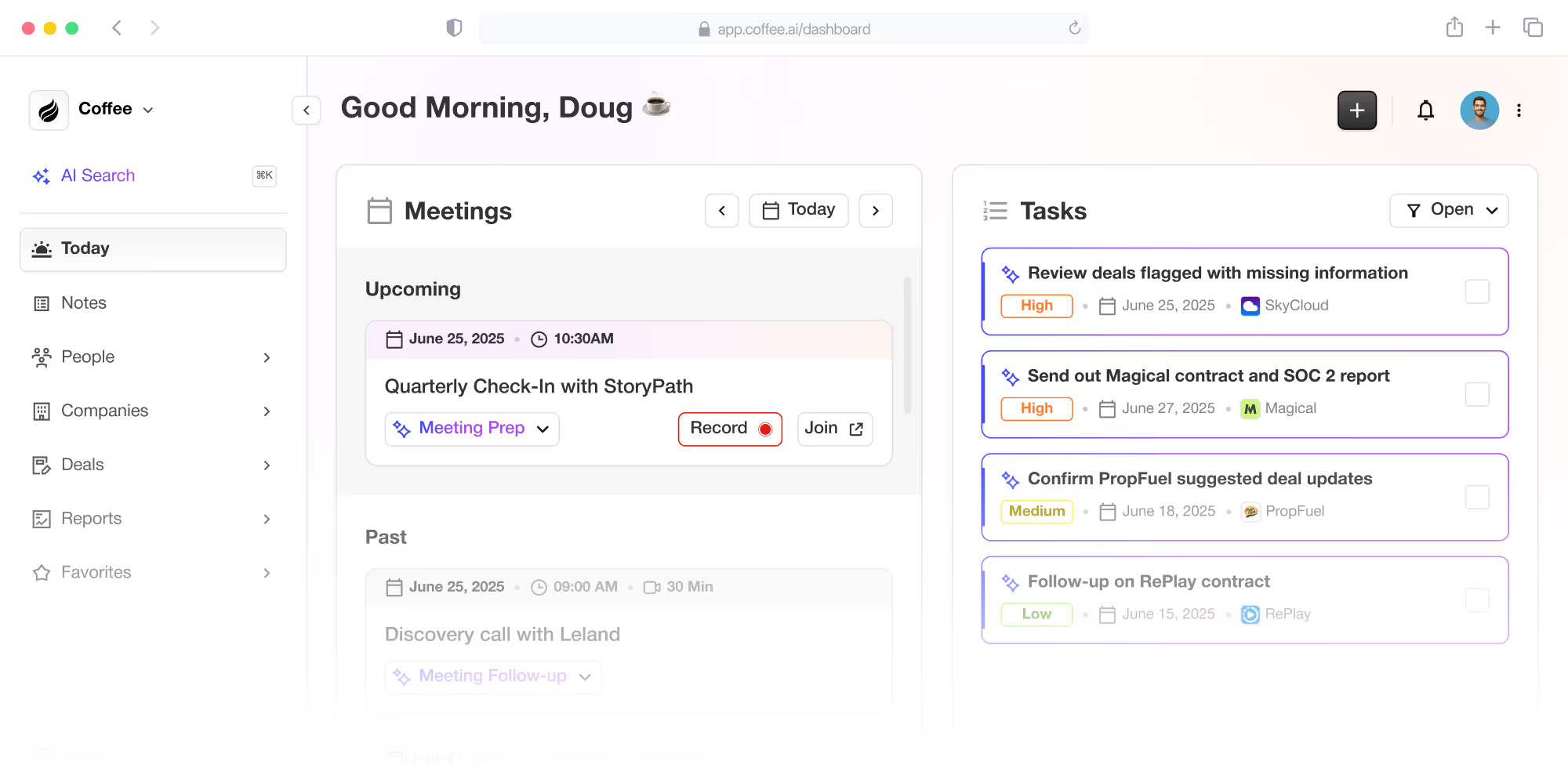
Coffee uses AI to automate these workflows. Its Meeting Bot joins calls on Google Meet, Microsoft Teams, or Zoom, recording and transcribing conversations. Before a meeting, Coffee’s ‘Today’ page provides a briefing with attendee details, company background, and past interaction summaries. After the call, it delivers structured summaries, identifies next steps, and drafts follow-up emails ready to send via Gmail.
The platform aligns summaries with sales frameworks like BANT or MEDDIC for consistency. To get started, enable the AI bot for your video conferencing tool and adjust notification settings. Insights arrive through Coffee’s interface or Slack, saving hours on meeting-related tasks.
3. Understand Pipeline Trends with AI Insights
Traditional CRM reports often lag, relying on manual effort and past data. This makes it hard for sales leaders to spot pipeline trends or prioritize deals needing attention.
Coffee’s Pipeline Compare feature uses AI to provide clear visibility. It stores historical pipeline snapshots in a data warehouse, allowing users to compare week-over-week changes with a single click. You can see which deals moved forward, new opportunities added, or prospects that stalled, all without manual exports or extra tools.
To set this up, define your pipeline stages and schedule automated snapshots. Coffee tracks changes and builds reports, offering actionable insights for strategy adjustments and deal prioritization during reviews.
4. Simplify Your Sales Tech with a Unified Platform
Sales teams often juggle multiple tools for CRM, call recording, forecasting, and data enrichment. This fragmented setup raises costs and creates inefficiencies through poor integration.
Coffee combines these functions into one system, cutting both expenses and complexity. Its AI-driven features handle diverse needs, from automation to analytics, within a single interface.
Start by reviewing your current tech stack to spot overlapping tools. Map these to Coffee’s features to estimate savings on licensing, training, and integration efforts. This consolidation streamlines workflows and boosts team focus.
5. Target Prospects More Effectively with AI Tools
Building prospect lists manually is slow and often yields incomplete results due to limited data access. Sales reps waste time on research instead of outreach.
Coffee’s List Builder changes this with natural language search. Users can input specific criteria, like “VPs of sales in North American companies with 50 to 500 employees, over $10 million in funding, using Salesforce.” The system pulls enriched data to create precise lists in minutes, a task that could take hours otherwise.
Set this up by defining your ideal customer profile and crafting queries. Configure Coffee to refresh lists automatically and pair them with personalized outreach sequences based on prospect details.
6. Boost CRM Use with an Intuitive Design
Low CRM adoption undermines sales data quality and productivity. Many traditional systems feel like a burden to reps, leading to spotty usage and incomplete records.
Coffee counters this with a design that supports reps directly. It acts as a smart assistant, automating tedious tasks while offering actionable insights for daily work. Features like automatic contact updates and meeting briefings make the platform a helpful tool, not a chore.
Roll this out by gathering user feedback and tailoring the interface to common needs. Provide training on how Coffee supports sales goals, and track adoption metrics to address any hurdles. Ready to try a CRM your team will actually use? Request access to see the difference.
7. See Proven Results from AI CRM Adoption
Practical examples highlight AI CRM’s impact. A growing company earning tens of millions annually, building AI solutions for Fortune 500 clients, moved from spreadsheets to Coffee. After comparing options, they picked Coffee for its easy-to-use interface, automatic contact setup with Google Workspace, weekly pipeline reviews via Pipeline Compare, and API flexibility for custom data needs.
This case shows how Coffee meets the needs of scaling teams, offering a modern alternative to legacy systems with quick setup and clear benefits, fitting into the wider trend of AI-driven sales tools.
AI CRM vs. Traditional CRM: Comparing Costs and Benefits
Evaluating AI-native CRMs against traditional systems requires assessing both direct costs and operational effects. Coffee offers distinct advantages in efficiency and value, as shown below:
| Aspect | Traditional CRM | AI-Native CRM (Coffee) | Impact |
|---|---|---|---|
| Implementation | Complex setup, high manual effort | Quick setup, automated processes | Faster results |
| Operational Costs | High labor, multiple tools needed | Automation cuts labor, unifies tools | Reduced expenses |
| User Adoption | Low due to clunky design | High with practical features | Improved data accuracy |
| Sales Productivity | Hindered by admin tasks | Boosted by automation, saving 8-12 hours/week | More revenue focus |
Common Questions About AI CRM
How Does AI CRM Save on Sales Costs?
AI CRMs like Coffee lower costs by automating repetitive work, reducing the need for multiple tools, and increasing productivity. Coffee frees up 8 to 12 hours per rep each week through automated data entry and meeting tasks, giving more time for sales.
Can AI CRM Reduce Admin Work for Sales Teams?
Absolutely. Coffee cuts down on admin tasks by handling data entry, activity tracking, meeting notes, and follow-up drafts. This lets reps prioritize strategic selling over paperwork.
What Traditional CRM Issues Does Coffee Fix?
Coffee addresses manual data entry, scattered toolsets, outdated systems, and low usage rates in traditional CRMs. It offers automation, a unified platform, modern AI capabilities, and a design that reps find useful.
Does Coffee Improve Data Accuracy Over Traditional CRMs?
Yes, Coffee enhances data quality by pulling information from emails, calendars, and call transcripts automatically, then enriching it with verified data sources. This minimizes human error and supports better decision-making.
How Does Coffee’s Pricing Support Cost Savings?
Coffee uses a straightforward per-seat pricing model, avoiding complicated fee structures. Combined with time savings and reduced tool overlap, this approach ties costs directly to the value provided.
Key Takeaways: Elevate Sales with AI CRM
Traditional CRMs often slow down sales teams with manual processes and disconnected tools. Coffee, as an AI-first platform, counters these issues by automating workflows, integrating functions, and focusing on user-friendly design.
The seven strategies covered, from cutting data entry to leveraging real-world success, outline how AI CRM can reshape sales operations. Coffee exemplifies this shift, offering measurable time savings and efficiency gains as part of the growing AI trend in sales tech.
Want to see these benefits for your team? Request access to Coffee and discover how it can improve your sales productivity and cost-effectiveness.