Written by: Doug Camplejohn, CEO & Co-Founder, Coffee | Last updated: July 8, 2026
Key Takeaways
-
Sales reps lose 40% of their time to manual CRM updates and fragmented tools instead of selling, which creates widespread lead leakage.
-
AI CRM agents remove the data-entry grind by autonomously capturing emails, calendar events, and call transcripts directly into the CRM.
-
Teams using AI agents report up to 7.1 hours saved per rep weekly on research and drafting, which frees time for high-value selling.
-
Clean, complete CRM data supports faster speed-to-lead, stronger predictive scoring, and measurable lifts in conversion and win rates.
-
A 30-day Coffee pilot on your existing Salesforce or HubSpot instance can reveal productivity gains within weeks.
The Data-Entry Grind That Kills Sales Productivity
Gen Z sales reps lose approximately two full hours every week to manual data entry alone, according to Salesforce’s 2026 survey. That figure understates the total administrative burden. Bain & Company’s 2025 Technology Report found that reps spend only about 25% of their working hours actually selling, with the remainder consumed by CRM entry, internal reporting, and administrative tasks. Industry reports show that sellers spend substantial time on activities that could be delegated, automated, or simplified.
The core problem sits in the architecture. Legacy CRMs act as passive containers. They store data only when a human inputs it, and they lack a reliable way to capture unstructured information from emails, call transcripts, or calendar events. The result is a fragmented stack: a CRM for records, a separate enrichment tool, a sequencing platform, a call recorder, and a forecasting add-on, each requiring manual stitching. When fields stay unfilled, downstream output becomes unreliable. AI agents layered on CRM data amplify quality problems because, unlike human analysts who can apply skepticism, autonomous agents will act on bad data and propagate incorrect decisions at scale.
This fragmentation creates a vicious cycle. Low adoption produces bad data. Bad data produces bad forecasts. Bad forecasts erode trust in the CRM entirely. Reps retreat to spreadsheets and Notion, and the system of record turns into a fiction.
How AI CRM Agents Remove Manual Data Entry
An AI CRM agent replaces the human data-entry loop with autonomous capture. After connecting to Google Workspace or Microsoft 365, the agent scans emails and calendar events to auto-create contacts, log activities, and enrich records with job titles, funding data, and LinkedIn profiles. It joins calls via a meeting bot, transcribes conversations in real time, and writes structured summaries, tagged to BANT, MEDDIC, or SPICED frameworks, directly back to the CRM record. No human intervention is required between the conversation and the logged data.

How AI Agents Turn Automation Into Productivity Gains
By eliminating the manual data-entry loop described above, AI agents create productivity gains through two simultaneous effects. Teams reclaim time from administrative tasks and redirect it toward high-value selling activities. Sellers with high Copilot and agent usage at Microsoft see improvements in deals closed, lead-to-opportunity conversion, and revenue per seller compared to low-usage peers. Gartner reports that sellers who effectively partner with AI tools are 3.7× more likely to meet quota than those who do not.
How AI CRM Agents Cut Data Entry and Research Time
AI agents cut data entry time by capturing information at the source instead of pushing it to the rep after the fact. They also shrink prospect research and email drafting time. AI agents reduce manual research time from 15–30 minutes per prospect to seconds by synthesizing company sites, news, LinkedIn, tech stacks, and filings in real time.

See how Coffee reclaims those 7.1 hours per week for your team and start your free trial.
Quantified Productivity Gains From AI CRM Agents
The table below consolidates 2025–2026 benchmark data on weekly time savings and related productivity metrics for sales teams that deploy AI CRM agents.
|
Metric |
Baseline (No AI Agent) |
With AI CRM Agent |
Source |
|---|---|---|---|
|
Weekly hours spent selling |
Bain 2025; Microsoft Work Trend Index |
||
|
Weekly hours saved per SDR (research & drafting) |
— |
BCG & Forrester 2026 |
Choosing an AI Tool That Works Inside Your CRM
The most effective AI tool for sales automation operates directly within the existing CRM instead of creating a parallel data silo. Bolt-on AI features that sit outside the CRM create data silos and require constant platform switching, which reduces effectiveness for sales organizations. The defining capability is autonomous data capture. The agent must write clean, structured data back to the system of record without human intermediation. Tools that only surface insights without fixing the underlying data quality problem leave the core issue unresolved.
AI automation can redirect significant time from research into actual selling time. At that scale, the ROI case becomes clear even before accounting for conversion rate improvements.

How Better CRM Data Directly Raises Conversion Rates
Clean CRM data functions as a conversion rate lever, not just a hygiene exercise. Four mechanisms explain how data quality connects to revenue outcomes.
Speed-to-lead: Companies responding to leads within one hour are seven times more likely to have meaningful conversations with decision-makers than those responding an hour later. AI agents that identify and route leads in real time, including from anonymous website traffic, compress response time from hours to minutes.
Predictive scoring: AI-enabled B2B sales teams can achieve improved lead-to-opportunity conversion rates through signal-driven prioritization instead of cold volume outreach. Studies have found a conversion lift when predictive AI scoring spans both marketing and sales.
Real-time coaching: Teams using conversation intelligence can close deals faster with improved win rates. Sellers using conversation intelligence are more likely to secure follow-up meetings compared to those without real-time guidance.
Win rate lift: When sales teams use AI lead scoring to prioritize their pipeline, they spend more time with qualified leads compared to manual scoring approaches. This focus on high-potential opportunities translates into measurable improvements in close rates because reps invest energy where it is most likely to convert.
Layering an AI Agent on Salesforce or HubSpot Instead of Replacing the CRM
For most mid-market teams, replacing Salesforce or HubSpot is not a viable option. Years of pipeline history, custom objects, quota structures, and forecasting configurations cannot move without significant risk. The practical path is deploying an AI agent as a companion layer that handles the data-in problem while the existing CRM remains the system of record.
The table below contrasts the two approaches across the dimensions that matter most to RevOps teams.
|
Dimension |
Passive Legacy CRM (No Agent) |
Existing CRM + AI Agent Companion |
Source |
|---|---|---|---|
|
Data capture method |
Manual human entry |
Autonomous from email, calendar, transcripts |
|
|
Data quality enforcement |
Relies on rep discipline, degrades over time |
Agent enforces completeness at point of capture |
|
|
Deployment timeline |
Weeks to months of admin configuration |
2–4 weeks for most mid-market teams |
Monday.com, 2026 |
|
Migration risk |
N/A (status quo) |
None, existing CRM remains system of record |
Coffee company context |
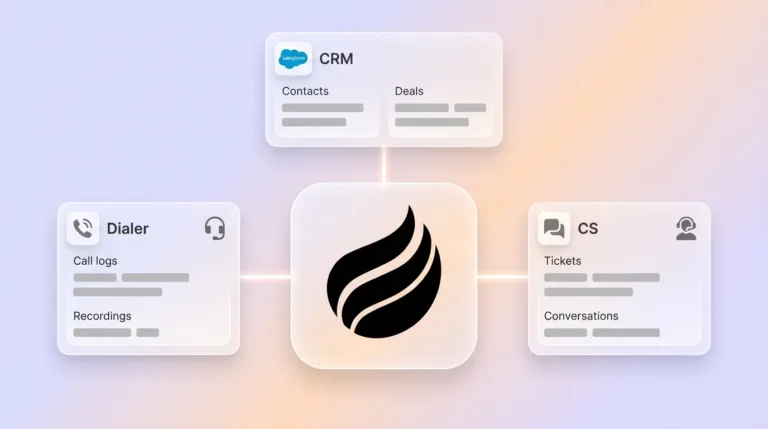
This is where Coffee’s “Good Data In, Good Data Out” philosophy becomes operationally concrete. Coffee deploys as a Companion App on top of existing Salesforce or HubSpot instances. The Coffee Agent handles autonomous contact creation, activity logging, meeting summaries, and pipeline tracking, and it writes clean, structured data back to the CRM without creating a parallel silo or forcing reps to change platforms.
Deploy Coffee as a companion layer to your existing CRM without migration risk and explore pricing.
Measuring ROI From an AI CRM Agent in 30-60-90 Days
Launching a 30-60-90 Day AI CRM Agent Plan
A structured 30-60-90 day framework gives RevOps teams the discipline to validate ROI and expand deployment with confidence.
-
Days 1–7 (Audit): Inventory current CRM field completion rates, average time-to-log per activity, and weekly hours reported on administrative tasks. Establish baseline metrics for speed-to-lead, pipeline coverage ratio, and win rate by segment.
-
Days 8–30 (Pilot): Connect the AI agent to Google Workspace or Microsoft 365. Run autonomous capture on a subset of the team. Track contact auto-creation rate, activity log completeness, and rep-reported hours saved weekly. Target the agent handling at least 80% of routine data entry with no manual correction required.
-
Days 31–60 (Expand): Roll out to the full team. Activate the meeting bot, automated follow-up drafting, and pipeline compare. Measure reduction in pipeline review time, increase in follow-up send rate, and lead-to-opportunity conversion rate versus baseline.
-
Days 61–90 (Optimize): Review win rate trend, average deal cycle length, and forecast accuracy. Measurable improvements from AI agents in RevOps can appear within several weeks. Set quarterly targets for the next cycle based on observed gains.
Launch your 30-day Coffee pilot and measure ROI from day one, then get started now.
Frequently Asked Questions
Does Coffee work with my existing Salesforce or HubSpot instance, or does it replace it?
Coffee operates as a Companion App on your existing Salesforce or HubSpot instance, so no migration is required. See the “Layering an AI Agent on Salesforce or HubSpot Instead of Replacing the CRM” section above for details on how the integration works.
What data sources does the Coffee Agent capture from?
After connecting to Google Workspace or Microsoft 365, the Coffee Agent captures data from emails, calendar events, and call transcripts through an AI meeting bot that joins Zoom, Teams, and Google Meet sessions. It also enriches records with job titles, funding data, and LinkedIn profiles through licensed data partners. A website tracking pixel converts anonymous site visitors into named, qualified prospects with enrichment pre-filled.
Is Coffee secure, and how is my data handled?
Coffee is SOC 2 Type 2 and GDPR compliant. Customer data is not used to train public AI models. For mid-market teams in regulated-adjacent industries, Coffee’s security posture covers the standard requirements for U.S. tech companies. Organizations in heavily regulated sectors such as healthcare or finance with multi-year security review requirements fall outside Coffee’s current ideal customer profile.
How quickly can a mid-market sales team deploy Coffee and see results?
Most teams connect Coffee to their CRM and email or calendar environment within a single session. The agent begins capturing contacts and logging activities immediately. Measurable reductions in manual data entry appear within the first week. Conversion rate and pipeline quality improvements typically become statistically meaningful within six to eight weeks as the agent accumulates a full picture of deal history and rep activity patterns.
What integrations does Coffee support beyond Salesforce and HubSpot?
Coffee currently supports integrations with external tools via Zapier, with deeper native integrations on the product roadmap. Within the core platform, Coffee consolidates functions that typically require separate point solutions, including CRM, data enrichment, call recording, meeting summaries, and pipeline forecasting, which reduces the number of third-party integrations a team needs to maintain. Teams using ZoomInfo, Apollo, Gong, or Fathom as standalone tools can evaluate Coffee as a consolidated replacement for several of those functions.