Written by: Doug Camplejohn, CEO & Co-Founder, Coffee | Last updated: June 30, 2026
Key Takeaways for Sales Leaders
- Legacy CRMs force manual data entry and lose historical context when fields are updated, while AI-agent systems like Coffee capture and preserve all activity automatically.
- Implementation and ongoing admin effort drop dramatically with AI agents, as authentication to Google Workspace or Microsoft 365 replaces weeks of configuration and recurring maintenance.
- AI-agent CRMs deliver accurate, real-time pipeline visibility and forecasting by tracking every change in a built-in data warehouse, eliminating the need for CSV exports or paid add-ons.
- Stack consolidation with an AI agent reduces total cost of ownership by replacing multiple point solutions (enrichment, recording, forecasting) with a single platform that scales without proportional admin growth.
- Teams ready to eliminate manual data entry and improve forecast accuracy should get started with Coffee today.
Legacy CRMs vs AI-Agent CRMs: Side-by-Side Comparison
| Criteria | Legacy Passive CRMs | AI-Agent CRMs | Observable Outcome |
|---|---|---|---|
| Data quality & automation depth | Relies on manual rep entry, structured fields only, historical context lost on field updates | Agent ingests email, calendar, and transcript data automatically, structured and unstructured data unified in a data warehouse | Agent-built records remain current without rep effort, legacy records degrade as entry lapses |
| Implementation & admin effort | Multi-week configuration, ongoing admin required to maintain fields, workflows, and integrations | Authentication to Google Workspace or Microsoft 365 activates the agent, minimal ongoing configuration | Legacy deployments accumulate technical debt, agent systems reduce recurring admin burden |
| Pipeline visibility & forecasting | Accuracy depends on rep discipline, week-over-week changes require manual CSV exports or paid add-ons | Agent tracks all pipeline changes automatically via built-in data warehouse, compare views surface deal movement without exports | Agent-driven forecasts reflect ground-truth activity, legacy forecasts reflect whatever reps remembered to log |
| Total cost of ownership | License fee plus enrichment tools, recording tools, forecasting add-ons, and hidden rep hours | Seat-based pricing includes agent labor, consolidates enrichment, recording, and forecasting into one platform | Legacy stacks carry compounding point-solution costs, agent platforms reduce vendor count |
| User adoption | Reps view data entry as a chore, low adoption produces shadow CRMs in spreadsheets or Notion | Agent handles the chores, reps interact with outputs rather than inputs | Higher adoption where reps receive value rather than perform maintenance |
| Integration complexity | Native integrations exist but require configuration, unstructured data sources unsupported natively | Connects via authentication, syncs enriched data back to Salesforce or HubSpot when used as companion, broader integrations via Zapier | Agent companion model preserves existing stack investments while improving data quality |
| Scalability (1–50 reps) | Scales in seat count but admin burden scales proportionally, data quality problems compound with team size | Agent labor scales without proportional admin increase, data warehouse architecture supports growing history | Agent systems maintain data quality as headcount grows, legacy systems require more admin resources |
Data Capture and Maintenance: Manual Entry vs Automatic History
Legacy CRMs assume that sales reps will reliably log every contact, company, and activity. In reality, reps toggle between HubSpot for records, a data enrichment tool for firmographics, a sequencing platform for outreach, and a recording tool for calls. Each handoff introduces gaps and inconsistencies. When a field is updated in a relational database architecture, the prior value is overwritten and the historical context is permanently lost.
An AI-agent CRM reverses this workflow and removes the logging burden from reps. After connecting to Google Workspace or Microsoft 365, Coffee's agent scans emails and calendars to auto-create contacts and companies, logs last and next activity autonomously, and enriches records with job titles, funding data, and LinkedIn profiles via licensed data partners. Reps receive a populated CRM on day one without entering a single record manually. According to Coffee's own data, this automation saves reps eight to twelve hours per week, time previously consumed by data entry rather than selling. Beyond passive data capture, the agent also sets up cleaner inputs for every future sales conversation.

Meeting Orchestration: Scattered Notes vs Agent Assistant
Legacy CRM workflows require heavy manual effort before and after every meeting. Pre-meeting preparation means a rep manually reviews scattered notes, checks a separate recording platform for prior call transcripts, and drafts their own follow-up email after the call. Post-meeting, they return to the CRM to log notes, often hours later and from memory.
Coffee's agent operates as a pre- and post-meeting executive assistant that standardizes this process. Before a call, it surfaces a briefing covering attendees, roles, and prior interaction history. During the call, the agent joins via Zoom, Teams, or Meet to record and transcribe. After the call, it generates a structured summary, identifies next steps, and drafts a follow-up email in Gmail for the rep to review and send. The agent structures its notes according to BANT, MEDDIC, or SPICED automatically, which ensures consistent qualification data enters the pipeline without rep interpretation or manual formatting.


Pipeline Intelligence and Forecasting: Guesswork vs Ground Truth
Legacy CRM forecasting depends on the accuracy of manually entered deal stages, close dates, and amounts. Because legacy CRMs overwrite field history with each update, producing a week-over-week pipeline comparison typically requires a CSV export, a spreadsheet, and a dedicated analyst, or a paid forecasting add-on like Clari or Gong Forecast.
Coffee's agent captures every pipeline change in a built-in data warehouse, so historical context is preserved automatically. The Pipeline Compare feature visualizes deal movement, including progressed opportunities, stalled deals, and new additions, without exports or add-ons. Pipeline reviews shift from interrogating reps about what changed to discussing why it changed and what to do next. This distinction matters most for RevOps teams responsible for forecast accuracy at the board level.
Get started with Coffee and replace manual pipeline reviews with agent-driven intelligence.
Stack Consolidation and Flexibility: Point Tools vs Single Agent Layer
A typical mid-market sales stack built around a legacy CRM includes the CRM license, a data enrichment tool, a call recording and intelligence platform, a forecasting layer, and a sequencing tool. Each vendor adds contract complexity, integration maintenance, and per-seat cost. As headcount grows from ten to fifty reps, these costs compound and the integrations between tools become a dedicated admin responsibility.
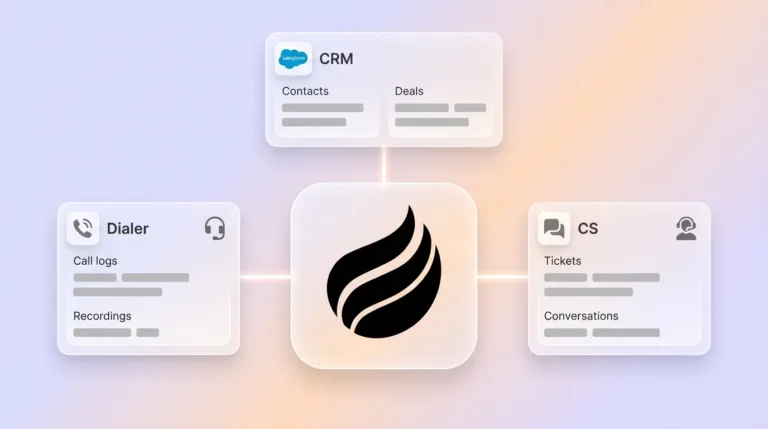
Coffee consolidates enrichment, recording, and pipeline intelligence into a single agent that sits at the center of the stack. For teams committed to Salesforce or HubSpot, the companion model deploys the agent as an intelligent layer that writes enriched data back to the existing system of record. Change management stays limited to authentication rather than a full platform migration. For teams starting fresh, the standalone CRM removes the legacy stack entirely. The agent's labor, which eliminates the manual work described earlier, scales without requiring proportional increases in admin headcount or tooling budget.
Best-Fit Use Cases: Replace or Augment Your CRM
Teams with one to twenty reps that have outgrown spreadsheets but view legacy CRMs as expensive maintenance burdens fit well with Coffee's standalone CRM. These teams gain a modern system of record where the agent manages data quality from day one and avoid inheriting twenty-five years of legacy architecture.
Mid-market teams of twenty to fifty reps that have invested in Salesforce or HubSpot, with established quotas, forecasting configurations, required fields, and executive reporting built on those platforms, benefit more from Coffee's companion model. The agent improves data quality and eliminates manual entry without requiring a system-of-record migration. Coffee's deep understanding of Salesforce and HubSpot integration complexity, including quota structures and required field validation, distinguishes it from newer alternatives like Clarify or Day.ai that lack this integration depth.
Risks and Limitations: Where Each Approach Falls Short
Legacy CRMs carry well-documented risks for sales teams. Data quality degrades as rep discipline lapses, shadow CRMs emerge when adoption fails, and the total cost of ownership grows with each point-solution addition. A deeper architectural risk also exists, because relational databases without data warehouses cannot preserve history or process unstructured data effectively, which limits the quality of any AI layer added on top.
AI-agent CRMs introduce a different set of limitations that leaders should weigh. Broader third-party integrations beyond Google Workspace, Microsoft 365, and Zapier are on Coffee's roadmap rather than fully available today. Teams in heavily regulated industries or large enterprises with complex custom workflows may find agent systems insufficiently configurable. Software alone does not fix broken sales processes, so an agent that captures weak qualification conversations will still produce structured records of weak qualification. Process discipline remains a human responsibility.
Decision Framework: Matching CRM Paths to Real Constraints
The right CRM path depends on three factors, which include team size, existing system investment, and regulatory constraints. For teams with one to ten reps and no existing CRM investment, Coffee's standalone CRM is the direct fit, and these teams gain automation without inheriting legacy complexity. Teams with ten to fifty reps already running Salesforce or HubSpot face a different calculation, because the companion model preserves their existing investment while solving the data quality problem that plagues larger implementations. However, teams in heavily regulated industries or enterprises with deeply customized CRM workflows should recognize that legacy platforms with dedicated admin resources remain the practical choice until agent systems mature further in compliance certifications and configurability.
Frequently Asked Questions
How long does Coffee implementation take?
Coffee implementation is designed to be measured in minutes rather than weeks. Connecting Google Workspace or Microsoft 365 authenticates the agent and activates automatic contact creation, activity logging, and enrichment immediately. There is no multi-week configuration phase, no data migration required for the standalone CRM, and no custom field mapping needed to begin capturing value. Teams using the companion model for Salesforce or HubSpot authenticate once and the agent begins syncing enriched data back to the existing system of record.
What is the migration effort from Salesforce or HubSpot?
For teams adopting Coffee as a companion agent, there is no migration, because Salesforce or HubSpot remains the system of record and Coffee writes data into it. For teams replacing a legacy CRM with Coffee's standalone platform, the migration scope depends on the volume of historical records. Coffee's agent begins capturing new activity immediately upon connection, so teams can operate on clean forward-looking data while historical records are transferred separately. The absence of complex field mapping requirements reduces the typical migration timeline significantly compared with moving between legacy platforms.
How does Coffee handle security and compliance?
Coffee is SOC 2 Type 2 certified and GDPR compliant. Data processed by the Coffee agent is not used to train public AI models. For most mid-market sales teams, this certification level satisfies procurement and legal review requirements. Teams in healthcare or financial services with multi-year security review cycles or highly specific regulatory requirements should evaluate whether Coffee's current compliance posture meets their specific obligations before committing.
How does Coffee data quality compare with dedicated enrichment tools?
Coffee's enrichment, delivered via licensed data partners, is roughly on par with dedicated tools like Apollo or ZoomInfo for the majority of mid-market use cases, covering job titles, company funding, and LinkedIn profiles. The meaningful difference is that Coffee's enrichment is built into the agent workflow rather than requiring a separate tool, separate contract, and manual import process. Teams with highly specialized enrichment requirements, such as intent data or technographic signals beyond Coffee's current partner coverage, may still benefit from a dedicated enrichment layer, though this represents an edge case for most one-to-fifty rep teams.
Which approach scales best for 1–10 reps versus 20–50 reps?
For one-to-ten rep teams, Coffee's standalone CRM scales cleanly with the seat-based pricing model described earlier, covering unlimited agent activity as deal volume grows. For twenty-to-fifty rep teams already on Salesforce or HubSpot, the companion model scales by improving data quality across a larger rep base without adding admin headcount. The data warehouse architecture underlying Coffee's pipeline intelligence preserves history as the team grows, which means forecasting accuracy improves over time rather than degrading as it does in relational database systems where field updates overwrite prior values.
Conclusion: Choosing the Right CRM for Sales Teams in 2025
The 2025 CRM decision reduces to one architectural question about who serves whom in the sales stack. Legacy passive CRMs require reps to act as data-entry clerks, producing pipelines that reflect what was logged rather than what actually happened. AI-agent systems like Coffee reverse this by handling data capture, meeting orchestration, and pipeline intelligence autonomously, so reps spend their time selling and managers get forecasts they can trust.
Teams ready to replace a legacy system or augment an existing Salesforce or HubSpot instance with an agent that eliminates manual entry have a clear path forward.
Get started with Coffee and hire the AI agent your sales team actually needs in 2025.