
In today’s competitive sales landscape, Customer Relationship Management (CRM) systems like Salesforce promise to streamline operations and boost revenue. Yet, many organizations struggle with a troubling reality: their sales teams aren’t fully using these platforms. This gap isn’t just a minor hiccup. It reflects a deeper mismatch between how CRMs are built and the day-to-day needs of sales professionals. The global CRM market, valued at over $50 billion in 2023, continues to grow as businesses invest heavily in these tools to centralize data and improve forecasting. However, user adoption remains a persistent barrier, often tied to clunky interfaces, administrative overload, and a lack of alignment with real sales workflows.
This issue touches every level of a sales organization. Poor adoption means incomplete data, unreliable forecasts, and missed opportunities, all of which can stall growth. Sales reps, burdened by manual tasks, spend less time closing deals. Managers lack visibility into pipelines. Leadership can’t trust the numbers for strategic planning. As businesses navigate an increasingly data-driven world, solving this user experience problem becomes critical. Thankfully, a wave of AI-driven solutions is emerging to address these challenges, enhancing platforms like Salesforce with automation and intuitive design. One such tool, Coffee’s Companion App, exemplifies this trend by prioritizing ease of use and direct value for sales reps, fitting into a broader movement toward smarter, more user-focused CRM ecosystems.
Understanding Low Salesforce Adoption: What Holds Sales Teams Back?
The Real Impact of Limited CRM Use
Low adoption rates create a significant hurdle for sales organizations relying on CRM systems. Fewer than 40% of companies using CRM systems see adoption rates above 90%. This means most teams miss out on key features and benefits they’ve paid for, leaving valuable tools untouched and undermining the investment.
When sales reps don’t regularly update the CRM, pipeline data becomes spotty and forecasts lose accuracy. Managers can’t track deal progress or spot coaching needs. The organization struggles to pinpoint winning strategies to replicate. What should be a central hub for sales operations turns into a source of frustration and wasted potential, directly affecting revenue outcomes.
This problem often spirals. Incomplete data from sporadic use makes the CRM less helpful, which further discourages engagement. Over time, this cycle turns a tool meant to drive performance into an expensive obstacle, eroding trust in the system across the team.
Too Much Time on Admin, Not Enough on Selling
Sales reps today face a heavy load of non-selling tasks that pull them away from their core role. About 70% of a rep’s time goes to activities unrelated to closing deals. Much of this involves manual data entry, updating records, and managing CRM workflows. In a standard 40-hour week, that leaves under 12 hours for actual selling.
Logging interactions in a CRM often feels like a chore. After each call or meeting, reps must enter notes, adjust opportunity details, copy emails, and link activities to the right contacts. This not only eats up time but also disrupts their focus, shifting them from high-energy sales mode to tedious data work.
The timing adds to the frustration. Right after a productive call, when insights are fresh and momentum is strong, reps should be following up or preparing for the next step. Instead, many are stuck filling out forms, losing that critical drive to push the deal forward.
Complex Interfaces and Workarounds Undermine CRM Value
Complicated CRM setups often push sales reps to find easier alternatives, fragmenting data. Only 37% of teams fully adopt their CRM, with most using just half of its core features. This isn’t due to a lack of functionality but rather interfaces and workflows that don’t match daily sales needs.
When CRMs feel like a task imposed by management rather than a helpful tool, reps turn to “shadow CRMs.” These are personal systems using tools like spreadsheets, Notion, or even paper notes to track deals and contacts. Often, these unofficial records hold the most accurate, up-to-date info, while the official CRM lags behind, updated only under pressure. This split creates blind spots for leaders and weakens team collaboration.
Overloaded menus, multi-step processes for simple actions, and irrelevant features also drive resistance. Sales reps need fast access to key data and workflows that fit their routines. When the system slows them down or feels disconnected from their immediate goals, they naturally seek simpler options, even if it means losing important capabilities.
Data Management Struggles Add to the Challenge
Some CRM setups struggle to balance ease of use with complex data needs. Traditional structures can limit how well they handle certain information types or deliver the real-time experience sales teams expect in today’s fast-paced environment.
Many systems aren’t built to process unstructured data, such as email threads or call transcripts, in a meaningful way. Valuable customer insights often sit buried in text fields, hard to search or act on. This forces reps to manually dig through records, a process that could be automated with modern tools.
Tracking long-term changes in opportunities or customer behavior can also be tricky without specific configurations. Without clear historical views, teams find it harder to spot trends or learn from past sales cycles systematically, missing chances to refine their approach.
How AI Can Turn Salesforce Into a True Sales Ally
AI-driven tools are changing how sales teams interact with CRMs like Salesforce. These solutions shift the CRM from a passive database requiring constant updates to an active partner that supports sales efforts. By focusing on user needs, they tackle the root causes of low adoption and offer clear, immediate benefits that reps can see and feel.
Sales professionals aren’t opposed to technology. They push back against tools that complicate their work. When a CRM automates repetitive tasks, offers actionable insights, and fits naturally into their day, it becomes something they choose to use. This focus on user experience boosts engagement while improving data accuracy for the whole organization.
With AI, CRMs can handle information capture and processing that once demanded manual effort. By connecting to email, calendars, and other data sources, these systems keep records complete and current without extra input. This saves time and reframes the CRM as a productivity booster, not a reporting chore.
Core Features of a User-Friendly CRM Setup
Effective AI-enhanced CRM systems share key traits that drive adoption and value. Here are the main elements that make a difference:
- Automated Data Capture: These tools pull info from emails, calendars, and other channels, logging interactions without manual work. They also enrich data with relevant details, ensuring records are thorough and useful.
- Smart Workflow Support: AI assists before and after meetings with context, summaries, and follow-up drafts. This active help turns the CRM into a partner in the sales process, not just a storage space.
- Simple, Predictive Interface: The design focuses on what reps need right now, offering relevant info at the right time. This makes using the system feel intuitive, not forced.
- Unified Tools: Instead of juggling separate apps for different tasks, a consolidated platform keeps everything in one place. This cuts complexity and ensures all sales data stays connected.
Coffee: A Leading AI Tool to Enhance Your Salesforce Experience
As part of the growing trend toward AI-driven CRM improvements, Coffee’s Companion App stands out by enhancing existing Salesforce setups. It focuses on automation and user-friendly design to tackle low adoption head-on. Rather than replacing your current system, Coffee works alongside Salesforce, delivering advanced features while preserving your data structure and integrations.
This approach lets sales teams quickly gain from AI efficiencies without disrupting established processes. IT departments can maintain security and governance standards, while reps enjoy a better daily experience. Coffee highlights how modern tools can bridge the gap between powerful CRM platforms and the practical needs of users.
Key Benefits Coffee Brings to Salesforce Users
Coffee offers specific features that address common adoption barriers. Here’s how it adds value:
- Effortless Data Handling: By linking to Google Workspace or Microsoft 365, Coffee auto-creates contacts and companies from emails and calendars. It enriches records with details like job titles and funding status, saving reps 8-12 hours weekly on data tasks.
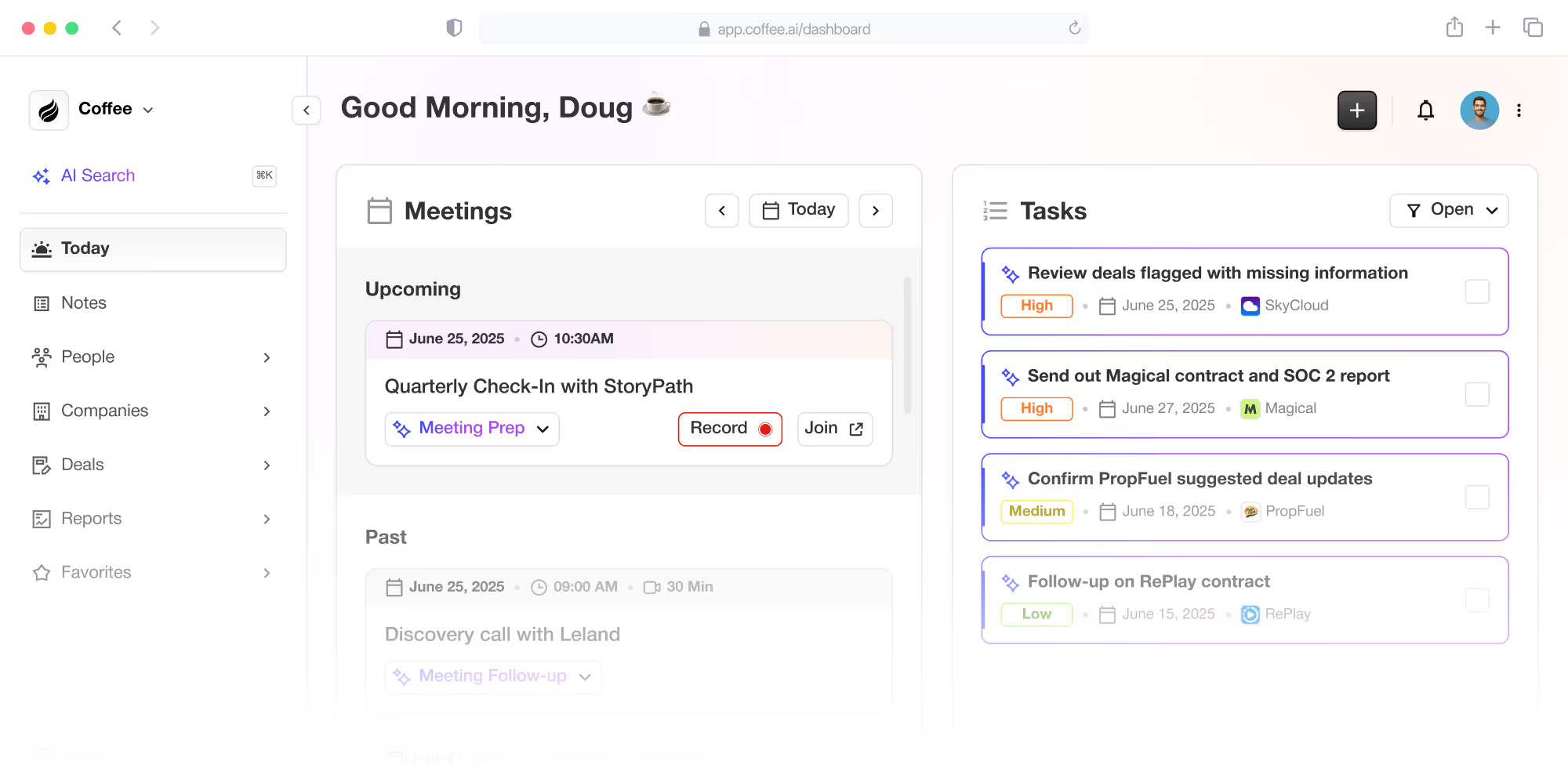
- Meeting Support with AI: Before calls, a dedicated page provides attendee info and past interaction summaries. During meetings, an AI bot records and transcribes across platforms like Zoom. Afterward, it summarizes key points and drafts follow-ups, letting reps focus on relationships.
- Pipeline Clarity: A unique “Compare” feature shows changes in the pipeline over time with one click. This makes reviews easier, highlighting deal progress or stalls without manual data pulls.
- Targeted Prospecting: Using natural language, reps can build lists of prospects based on specific criteria, such as company size or tech stack. This keeps outbound efforts within the CRM, streamlining workflows.
- Rep-Focused Design: Coffee prioritizes features that directly aid sales reps, shifting Salesforce’s image from a management tool to a helpful ally. This encourages voluntary use through real productivity gains.
How Coffee Directly Tackles Salesforce Adoption Issues
Reducing Data Entry Overload
Coffee cuts down the time reps spend on manual updates. Its system pulls data from emails and calendars to create and enrich records automatically. This frees up an estimated 8-12 hours per week, letting reps focus on closing deals rather than filling fields.
Improving Data Accuracy and Completeness
By capturing information directly from source communications, Coffee ensures records stay current and detailed. Continuous enrichment keeps data relevant, solving the problem of outdated info as reps shift focus to new prospects.
Shifting Perceptions of Salesforce
Coffee reframes Salesforce as a tool for reps, not just managers. With automation, meeting aids, and pipeline insights, it delivers clear benefits. This makes engagement a choice, driven by value rather than obligation.
Comparing Traditional Salesforce to Coffee-Enhanced Use
|
Aspect |
Standard Salesforce |
Salesforce with Coffee |
|
Data Entry |
Manual and time-intensive |
Automated via email/calendar |
|
Data Quality |
Frequently incomplete |
Accurate with AI enrichment |
|
Meeting Support |
Manual, external tools needed |
AI briefings and summaries |
|
Pipeline Analysis |
Manual reviews or exports |
Instant “Compare” insights |
|
Rep Perception |
Seen as a management chore |
Valued as a sales helper |
Boost Salesforce Engagement with Coffee’s Companion App
Turning a low-engagement Salesforce setup into a widely used sales asset means addressing user experience flaws. Coffee focuses on empowering reps with tools that save time and add value. When a CRM cuts administrative drag and supports daily tasks, adoption happens naturally, not through mandates.
Coffee targets specific pain points like data entry and perceived irrelevance. By automating updates and offering practical aids like meeting prep, it helps reps see the system as a boost to their success. Ready to improve your team’s Salesforce use? Request access to Coffee’s Companion App and see AI-driven improvements in action.
Common Questions About Coffee and Salesforce Integration
How Does Coffee Connect with My Current Salesforce Setup?
Coffee links to your Salesforce environment through a straightforward authentication process. It syncs data both ways, letting users decide which enriched info to push back to Salesforce. This keeps your control intact while adding automation benefits.
Does Coffee Replace Tools Like ZoomInfo?
Coffee’s built-in data enrichment often covers what separate tools like ZoomInfo provide, including contact and company details. This can help reduce costs and simplify your tech stack by keeping everything within the CRM.
What About Data Security with Coffee?
Coffee adheres to strict standards with SOC 2 Type 2 and GDPR compliance to safeguard your data. It processes information in secure settings and doesn’t use customer data for AI training without clear permission.
How Does Coffee Address Rep Resistance to New Tools?
Coffee overcomes adoption hurdles by removing manual work and offering instant value. Automation and proactive support save time, making it a tool reps view as helpful rather than extra effort.
Can Coffee Adapt to Our Sales Methods?
Coffee supports existing processes by aligning with frameworks like BANT or MEDDIC for deal summaries. It enhances your current workflows, boosting efficiency without forcing major changes.
Final Thoughts: Turn Salesforce Into a Strength with Coffee
Low Salesforce adoption often stems from a disconnect between system design and sales team realities. When reps spend hours on non-selling tasks and see the CRM as a burden, the investment loses impact. AI tools like Coffee’s Companion App address this by enhancing Salesforce with automation and user-focused features.
From cutting data entry to aiding meetings and refining pipeline views, Coffee helps boost engagement, data quality, and productivity. It builds on your existing setup without disruption. Don’t let poor user experience limit your sales potential. Request access to Coffee’s Companion App today to elevate your CRM and team performance.